mirror of
https://github.com/documenso/documenso.git
synced 2026-07-10 04:55:02 +10:00
Compare commits
16 Commits
| Author | SHA1 | Date | |
|---|---|---|---|
 Ephraim Atta-Duncan Ephraim Atta-Duncan
|
d4659eee07 | ||
 Ephraim Atta-Duncan Ephraim Atta-Duncan
|
9dcab76cd5 | ||
 Lucas Smith Lucas Smith
|
dfebdfccda | ||
|
Lucas Smith
|
c3d9cac43f | ||
|
Lucas Smith
|
74355244a4 | ||
|
Mythie
|
8be52e2fa3 | ||
|
Mythie
|
0d702e9189 | ||
|
Mythie
|
425db8fc1f | ||
|
Mythie
|
2356f58e7b | ||
|
Mythie
|
6c12ed4afc | ||
|
Lucas Smith
|
d76ee7f33c | ||
|
Mythie
|
f8534b2c3d | ||
|
Mythie
|
9014f01276 | ||
 Timur Ercan Timur Ercan
|
71818c0f1f | ||
|
Lucas Smith
|
ed4cbe9fa6 | ||
|
Mythie
|
a2ef9468ae |
@@ -15,6 +15,20 @@ NEXT_PRIVATE_DATABASE_URL="postgres://documenso:password@127.0.0.1:54320/documen
|
||||
# Defines the URL to use for the database when running migrations and other commands that won't work with a connection pool.
|
||||
NEXT_PRIVATE_DIRECT_DATABASE_URL="postgres://documenso:password@127.0.0.1:54320/documenso"
|
||||
|
||||
# [[STORAGE]]
|
||||
# OPTIONAL: Defines the storage transport to use. Available options: database (default) | s3
|
||||
NEXT_PUBLIC_UPLOAD_TRANSPORT="database"
|
||||
# OPTIONAL: Defines the endpoint to use for the S3 storage transport. Relevant when using third-party S3-compatible providers.
|
||||
NEXT_PRIVATE_UPLOAD_ENDPOINT=
|
||||
# OPTIONAL: Defines the region to use for the S3 storage transport. Defaults to us-east-1.
|
||||
NEXT_PRIVATE_UPLOAD_REGION=
|
||||
# REQUIRED: Defines the bucket to use for the S3 storage transport.
|
||||
NEXT_PRIVATE_UPLOAD_BUCKET=
|
||||
# OPTIONAL: Defines the access key ID to use for the S3 storage transport.
|
||||
NEXT_PRIVATE_UPLOAD_ACCESS_KEY_ID=
|
||||
# OPTIONAL: Defines the secret access key to use for the S3 storage transport.
|
||||
NEXT_PRIVATE_UPLOAD_SECRET_ACCESS_KEY=
|
||||
|
||||
# [[SMTP]]
|
||||
# OPTIONAL: Defines the transport to use for sending emails. Available options: smtp-auth (default) | smtp-api | mailchannels
|
||||
NEXT_PRIVATE_SMTP_TRANSPORT="smtp-auth"
|
||||
|
||||
@@ -1,13 +1,11 @@
|
||||
<p align="center" style="margin-top: 120px">
|
||||
<a href="https://github.com/documenso/documenso.com">
|
||||
<a href="https://github.com/documenso/documenso">
|
||||
<img width="250px" src="https://github.com/documenso/documenso/assets/1309312/cd7823ec-4baa-40b9-be78-4acb3b1c73cb" alt="Documenso Logo">
|
||||
</a>
|
||||
|
||||
<h3 align="center">Open Source Signing Infrastructure</h3>
|
||||
|
||||
<p align="center">
|
||||
The DocuSign Open Source Alternative.
|
||||
<br />
|
||||
The Open Source DocuSign Alternative.
|
||||
<br>
|
||||
<a href="https://documenso.com"><strong>Learn more »</strong></a>
|
||||
<br />
|
||||
<br />
|
||||
@@ -22,12 +20,16 @@
|
||||
</p>
|
||||
|
||||
<p align="center">
|
||||
<a href="https://documen.so/discord"><img src="https://img.shields.io/badge/Discord-documen.so/discord-%235865F2" alt="Join Documenso on Discord"></a>
|
||||
<a href="https://documen.so/discord"><img src="https://img.shields.io/badge/Discord-documen.so/discord-%235865F2" alt="Join Documenso on Discord"></a>
|
||||
<a href="https://github.com/documenso/documenso/stargazers"><img src="https://img.shields.io/github/stars/documenso/documenso" alt="Github Stars"></a>
|
||||
<a href="https://github.com/documenso/documenso/blob/main/LICENSE"><img src="https://img.shields.io/badge/license-AGPLv3-purple" alt="License"></a>
|
||||
<a href="https://github.com/documenso/documenso/pulse"><img src="https://img.shields.io/github/commit-activity/m/documenso/documenso" alt="Commits-per-month"></a>
|
||||
</p>
|
||||
|
||||
> **🚧 We're currently working on a large scale refactor which can be found on the [feat/refresh](https://github.com/documenso/documenso/tree/feat/refresh) branch.**
|
||||
>
|
||||
> **[Read more on why 👀](https://documenso.com/blog/why-were-doing-a-rewrite)**
|
||||
|
||||
# Documenso 0.9 - Developer Preview
|
||||
|
||||
<div>
|
||||
@@ -63,18 +65,28 @@ Signing documents digitally is fast, easy and should be best practice for every
|
||||
|
||||
## Community and Next Steps 🎯
|
||||
|
||||
The current project goal is to <b>[release a production ready version](https://github.com/documenso/documenso/milestone/1)</b> for self-hosting as soon as possible. If you want to help making that happen you can:
|
||||
We're currently working on a redesign of the application including a revamp of the codebase so Documenso can be more intuitive to use and robust to develop upon.
|
||||
|
||||
- Check out the first source code release in this repository and test it
|
||||
- Tell us what you think in the current [Discussions](https://github.com/documenso/documenso/discussions)
|
||||
- Join the [Slack Channel](https://documen.so/slack) for any questions and getting to know to other community members
|
||||
- Join the [Discord server](https://documen.so/discord) for any questions and getting to know to other community members
|
||||
- ⭐ the repository to help us raise awareness
|
||||
- Spread the word on Twitter, that Documenso is working towards a more open signing tool
|
||||
- Fix or create [issues](https://github.com/documenso/documenso/issues), that are needed for the first production release
|
||||
|
||||
## Contributing
|
||||
|
||||
- To contribute please see our [contribution guide](https://github.com/documenso/documenso/blob/main/CONTRIBUTING.md).
|
||||
- To contribute, please see our [contribution guide](https://github.com/documenso/documenso/blob/main/CONTRIBUTING.md).
|
||||
|
||||
## Contact us
|
||||
|
||||
Contact us if you are interested in our Enterprise plan for large organizations that need extra flexibility and control.
|
||||
|
||||
<a href="https://cal.com/timurercan/enterprise-customers?utm_source=banner&utm_campaign=oss"><img alt="Book us with Cal.com" src="https://cal.com/book-with-cal-dark.svg" /></a>
|
||||
|
||||
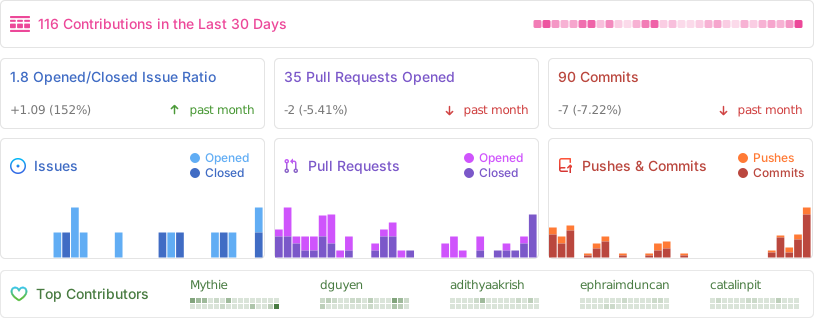
## Activity
|
||||
|
||||
|
||||
|
||||
# Tech
|
||||
|
||||
@@ -89,10 +101,6 @@ Documenso is built using awesome open source tech including:
|
||||
- [Node SignPDF (Digital Signature)](https://github.com/vbuch/node-signpdf)
|
||||
- [React-PDF for viewing PDFs](https://github.com/wojtekmaj/react-pdf)
|
||||
- [PDF-Lib for PDF manipulation](https://github.com/Hopding/pdf-lib)
|
||||
- [Zod for schema declaration and validation](https://zod.dev/)
|
||||
- [Lucide React for icons in React app](https://lucide.dev/)
|
||||
- [Framer Motion for motion library](https://www.framer.com/motion/)
|
||||
- [Radix UI for component library](https://www.radix-ui.com/)
|
||||
- Check out `/package.json` and `/apps/web/package.json` for more
|
||||
- Support for [opensignpdf (requires Java on server)](https://github.com/open-pdf-sign) is currently planned.
|
||||
|
||||
@@ -135,37 +143,47 @@ Your database will also be available on port `54320`. You can connect to it usin
|
||||
|
||||
## Developer Setup
|
||||
|
||||
### Manual Setup
|
||||
|
||||
Follow these steps to setup documenso on you local machine:
|
||||
|
||||
- [Clone the repository](https://help.github.com/articles/cloning-a-repository/) it to your local device.
|
||||
```sh
|
||||
git clone https://github.com/documenso/documenso
|
||||
```
|
||||
- Run <code>npm i</code> in root directory
|
||||
- Rename <code>.env.example</code> to <code>.env</code>
|
||||
- Run `npm i` in root directory
|
||||
- Rename `.env.example` to `.env`
|
||||
- Set DATABASE_URL value in .env file
|
||||
- You can use the provided test database url (may be wiped at any point)
|
||||
- Or setup a local postgres sql instance (recommended)
|
||||
- Create the database scheme by running <code>db-migrate:dev</code>
|
||||
- Create the database scheme by running `db-migrate:dev`
|
||||
- Setup your mail provider
|
||||
- Set <code>SENDGRID_API_KEY</code> value in .env file
|
||||
- Set `SENDGRID_API_KEY` value in .env file
|
||||
- You need a SendGrid account, which you can create [here](https://signup.sendgrid.com/).
|
||||
- Documenso uses [Nodemailer](https://nodemailer.com/about/) so you can easily use your own SMTP server by setting the <code>SMTP\_\* variables</code> in your .env
|
||||
- Run <code>npm run dev</code> root directory to start
|
||||
- Documenso uses [Nodemailer](https://nodemailer.com/about/) so you can easily use your own SMTP server by setting the `SMTP
|
||||
\_
|
||||
* variables` in your .env
|
||||
- Run `npm run dev` root directory to start
|
||||
- Register a new user at http://localhost:3000/signup
|
||||
|
||||
---
|
||||
|
||||
- Optional: Seed the database using <code>npm run db-seed</code> to create a test user and document
|
||||
- Optional: Upload and sign <code>apps/web/resources/example.pdf</code> manually to test your setup
|
||||
- Optional: Seed the database using `npm run db-seed` to create a test user and document
|
||||
- Optional: Upload and sign `apps/web/resources/example.pdf` manually to test your setup
|
||||
|
||||
- Optional: Create your own signing certificate
|
||||
- A demo certificate is provided in `/app/web/resources/certificate.p12`
|
||||
- To generate your own using these steps and a Linux Terminal or Windows Subsystem for Linux (WSL) see **[Create your own signing certificate](#creating-your-own-signing-certificate)**.
|
||||
|
||||
### Run in Gitpod
|
||||
|
||||
- Click below to launch a ready-to-use Gitpod workspace in your browser.
|
||||
|
||||
[](https://gitpod.io/#https://github.com/documenso/documenso)
|
||||
|
||||
## Updating
|
||||
|
||||
- If you pull the newest version from main, using <code>git pull</code>, it may be necessary to regenerate your database client
|
||||
- If you pull the newest version from main, using `git pull`, it may be necessary to regenerate your database client
|
||||
- You can do this by running the generate command in `/packages/prisma`:
|
||||
```sh
|
||||
npx prisma generate
|
||||
@@ -176,16 +194,22 @@ Follow these steps to setup documenso on you local machine:
|
||||
|
||||
For the digital signature of your documents you need a signing certificate in .p12 format (public and private key). You can buy one (not recommended for dev) or use the steps to create a self-signed one:
|
||||
|
||||
1. Generate a private key using the OpenSSL command. You can run the following command to generate a 2048-bit RSA key:\
|
||||
<code>openssl genrsa -out private.key 2048</code>
|
||||
1. Generate a private key using the OpenSSL command. You can run the following command to generate a 2048-bit RSA key:
|
||||
|
||||
`openssl genrsa -out private.key 2048`
|
||||
|
||||
2. Generate a self-signed certificate using the private key. You can run the following command to generate a self-signed certificate:
|
||||
|
||||
`openssl req -new -x509 -key private.key -out certificate.crt -days 365`
|
||||
|
||||
2. Generate a self-signed certificate using the private key. You can run the following command to generate a self-signed certificate:\
|
||||
<code>openssl req -new -x509 -key private.key -out certificate.crt -days 365</code> \
|
||||
This will prompt you to enter some information, such as the Common Name (CN) for the certificate. Make sure you enter the correct information. The -days parameter sets the number of days for which the certificate is valid.
|
||||
3. Combine the private key and the self-signed certificate to create the p12 certificate. You can run the following command to do this: \
|
||||
<code>openssl pkcs12 -export -out certificate.p12 -inkey private.key -in certificate.crt</code>
|
||||
|
||||
3. Combine the private key and the self-signed certificate to create the p12 certificate. You can run the following command to do this:
|
||||
|
||||
`openssl pkcs12 -export -out certificate.p12 -inkey private.key -in certificate.crt`
|
||||
|
||||
4. You will be prompted to enter a password for the p12 file. Choose a strong password and remember it, as you will need it to use the certificate (**can be empty for dev certificates**)
|
||||
5. Place the certificate <code>/apps/web/resources/certificate.p12</code>
|
||||
5. Place the certificate `/apps/web/resources/certificate.p12`
|
||||
|
||||
# Docker
|
||||
|
||||
@@ -193,16 +217,42 @@ For the digital signature of your documents you need a signing certificate in .p
|
||||
|
||||
Want to create a production ready docker image? Follow these steps:
|
||||
|
||||
- Run `./docker/build.sh` in the root directory.
|
||||
- Publish the image to your docker registry of choice.
|
||||
- cd into `docker` directory
|
||||
- Make `build.sh` executable by running `chmod +x build.sh`
|
||||
- Run `./build.sh` to start building the docker image.
|
||||
- Publish the image to your docker registry of choice (or) If you prefer running the image from local, run the below command
|
||||
|
||||
# Deploying - Coming Soon™
|
||||
```
|
||||
docker run -d --restart=unless-stopped -p 3000:3000 -v documenso:/app/data --name documenso documenso:latest
|
||||
```
|
||||
|
||||
- Docker support
|
||||
- One-Click-Deploy on Render.com Deploy
|
||||
Command Breakdown:
|
||||
- `-d` - Let's you run the container in background
|
||||
- `-p` - Passes down which ports to use. First half is the host port, Second half is the app port. You can change the first half anything you want and reverse proxy to that port.
|
||||
- `-v` - Volume let's you persist the data
|
||||
- `--name` - Name of the container
|
||||
- `documenso:latest` - Image you have built
|
||||
|
||||
# Deployment
|
||||
|
||||
We support a variety of deployment methods, and are actively working on adding more. Stay tuned for updates!
|
||||
|
||||
## Railway
|
||||
|
||||
[](https://railway.app/template/DjrRRX)
|
||||
|
||||
## Render
|
||||
|
||||
[](https://render.com/deploy?repo=https://github.com/documenso/documenso)
|
||||
|
||||
# Troubleshooting
|
||||
|
||||
## I'm not receiving any emails when using the developer quickstart
|
||||
|
||||
When using the developer quickstart an [Inbucket](https://inbucket.org/) server will be spun up in a docker container that will store all outgoing email locally for you to view.
|
||||
|
||||
The Web UI can be found at http://localhost:9000 while the SMTP port will be on localhost:2500.
|
||||
|
||||
## Support IPv6
|
||||
|
||||
In case you are deploying to a cluster that uses only IPv6. You can use a custom command to pass a parameter to the NextJS start command
|
||||
|
||||
@@ -0,0 +1,198 @@
|
||||
---
|
||||
title: 'Deploying Documenso with Vercel, Supabase and Resend'
|
||||
description: This is the first part of the new Building Documenso series, where I describe the challenges and design choices that we make while building the world’s most open signing platform.
|
||||
authorName: 'Ephraim Atta-Duncan'
|
||||
authorImage: '/blog/blog-author-duncan.jpeg'
|
||||
authorRole: 'Software Engineer Intern'
|
||||
date: 2023-09-08
|
||||
tags:
|
||||
- Open Source
|
||||
- Self Hosting
|
||||
- Tutorial
|
||||
---
|
||||
|
||||
In this article, we'll walk you through how to deploy and self-host Documenso using Vercel, Supabase, and Resend.
|
||||
|
||||
You'll learn:
|
||||
|
||||
- How to set up a Postgres database using Supabase,
|
||||
- How to install SMTP with Resend,
|
||||
- How to deploy your project with Vercel.
|
||||
|
||||
If you don't know what [Documenso](https://documenso.com/) is, it's an open-source alternative to DocuSign, with the mission to create an open signing infrastructure while embracing openness, cooperation, and transparency.
|
||||
|
||||
## Prerequisites
|
||||
|
||||
Before we start, make sure you have a [GitHub](https://github.com/signup) account. You also need [Node.js](https://nodejs.org/en) and [npm](https://www.npmjs.com/) installed on your local machine (note: you also have the option to host it on a cloud environment using Gitpod for example; that would be another post). If you need accounts on Vercel, Supabase, and Resend, create them by visiting the [Vercel](https://vercel.com/), [Supabase](https://supabase.com/), and [Resend](https://resend.com/) websites.
|
||||
|
||||
Checklist:
|
||||
|
||||
- [ ] Have a GitHub account
|
||||
- [ ] Install Node.js
|
||||
- [ ] Install npm
|
||||
- [ ] Have a Vercel account
|
||||
- [ ] Have a Supabase account
|
||||
- [ ] Have a Resend account
|
||||
|
||||
## Step-by-Step guide to deploying Documenso with Vercel, Supabase, and Resend
|
||||
|
||||
To deploy Documenso, we'll take the following steps:
|
||||
|
||||
1. Fork the Documenso repository
|
||||
2. Clone the forked repository and install dependencies
|
||||
3. Create a new project on Supabase
|
||||
4. Copy the Supabase Postgres database connection URL
|
||||
5. Create a `.env` file
|
||||
6. Run the migration on the Supabase Postgres Database
|
||||
7. Get your SMTP Keys on Resend
|
||||
8. Create a new project on Vercel
|
||||
9. Add Environment Variables to your Vercel project
|
||||
|
||||
So, you're ready? Let’s dive in!
|
||||
|
||||
### Step 1: Fork the Documenso repository
|
||||
|
||||
Start by creating a fork of Documenso on GitHub. You can do this by visiting the [Documenso repository](https://github.com/documenso/documenso) and clicking on the 'Fork' button. (Also, star the repo!)
|
||||
|
||||

|
||||
|
||||
Choose your GitHub profile as the owner and click on 'Create fork' to create a fork of the repo.
|
||||
|
||||

|
||||
|
||||
### Step 2: Clone the forked repository and install dependencies
|
||||
|
||||
Clone the forked repository to your local machine in any directory of your choice. Open your terminal and enter the following commands:
|
||||
|
||||
```bash
|
||||
# Clone the repo using Github CLI
|
||||
gh repo clone [your_github_username]/documenso
|
||||
|
||||
# Clone the repo using Git
|
||||
git clone <https://github.com/[your_github_username]/documenso.git>
|
||||
```
|
||||
|
||||
You can now navigate into the directory and install the project’s dependencies:
|
||||
|
||||
```bash
|
||||
cd documenso
|
||||
npm install
|
||||
```
|
||||
|
||||
### Step 3: Create a new project on Supabase
|
||||
|
||||
Now, let's set up the database.
|
||||
|
||||
If you haven't already, create a new project on Supabase. This will automatically create a new Postgres database for you.
|
||||
|
||||
On your Supabase dashboard, click the '**New project**' button and choose your organization.
|
||||
|
||||
On the '**Create a new project**' page, set a database name of **documenso** and a secure password for your database. Choose a region closer to you, a pricing plan, and click on '**Create new project**' to create your project.
|
||||
|
||||

|
||||
|
||||
### Step 4: Copy the Supabase Postgres database connection URL
|
||||
|
||||
In your project, click the '**Settings**' icon at the bottom left.
|
||||
|
||||
Under the '**Project Settings**' section, click '**Database**' and scroll down to the '**Connection string**' section. Copy the '**URI**' and update it with the password you chose in the previous step.
|
||||
|
||||

|
||||
|
||||
### Step 5: Create a `.env` file
|
||||
|
||||
Create a `.env` file in the root of your project by copying the contents of the `.env.example` file.
|
||||
|
||||
Add the connection string you copied from your Supabase dashboard to the `DATABASE_URL` variable in the `.env` file.
|
||||
|
||||
The `.env` should look like this:
|
||||
|
||||
```bash
|
||||
DATABASE_URL="postgres://postgres:[YOUR-PASSWORD]@db.[YOUR-PROJECT-REF].supabase.co:5432/postgres"
|
||||
```
|
||||
|
||||
### Step 6: Run the migration on the Supabase Postgres Database
|
||||
|
||||
Run the migration on the Supabase Postgres Database using the following command:
|
||||
|
||||
```bash
|
||||
npx prisma migrate deploy
|
||||
```
|
||||
|
||||
### Step 7: Get your SMTP Keys on Resend
|
||||
|
||||
So, you've just cloned Documenso, installed dependencies on your local machine, and set your database using Supabase. Now, SMTP is missing. Emails won't go out! Let's fix it with Resend.
|
||||
|
||||
In the **[Resend](https://resend.com/)** dashboard, click 'Add API Key' to create a key for Resend SMTP.
|
||||
|
||||

|
||||
|
||||
Next, add and verify your domain in the '**Domains**' section on the sidebar. This will allow you to send emails from any address associated with your domain.
|
||||
|
||||

|
||||
|
||||
You can update your `.env` file with the following:
|
||||
|
||||
```jsx
|
||||
SMTP_MAIL_HOST = 'smtp.resend.com';
|
||||
SMTP_MAIL_PORT = '25';
|
||||
SMTP_MAIL_USER = 'resend';
|
||||
SMTP_MAIL_PASSWORD = 'YOUR_RESEND_API_KEY';
|
||||
MAIL_FROM = 'noreply@[YOUR_DOMAIN]';
|
||||
```
|
||||
|
||||
### Step 8: Create a new project on Vercel
|
||||
|
||||
You set the database with Supabase and are SMTP-ready with Resend. Almost there! The next step is to deploy the project — we'll use Vercel for that.
|
||||
|
||||
On your Vercel dashboard, create a new project using the forked project from your GitHub repositories. Select the project among the options and click '**Import**' to start running Documenso.
|
||||
|
||||

|
||||
|
||||
### Step 9: Add Environment Variables to your Vercel project
|
||||
|
||||
In the '**Configure Project**' page, adding the required Environmental Variables is essential to ensure the application deploys without any errors.
|
||||
|
||||
Specifically, for the `NEXT_PUBLIC_WEBAPP_URL` and `NEXTAUTH_URL` variables, you must add `.vercel.app` to your Project Name. This will form the deployment URL, which will be in the format: `https://[project_name].vercel.app`.
|
||||
|
||||
For example, in my case, the deployment URL is `https://documenso-supabase-web.vercel.app`.
|
||||
|
||||

|
||||
|
||||
This is a sample `.env` to deploy. Copy and paste it to auto-populate the fields and click ‘**Deploy.’** Now, you only need to wait for your project to deploy. You’re going live — enjoy!
|
||||
|
||||
```bash
|
||||
DATABASE_URL='postgresql://postgres:typeinastrongpassword@db.njuigobjlbteahssqbtw.supabase.co:5432/postgres'
|
||||
|
||||
NEXT_PUBLIC_WEBAPP_URL='https://documenso-supabase-web.vercel.app'
|
||||
NEXTAUTH_SECRET='something gibrish to encrypt your jwt tokens'
|
||||
NEXTAUTH_URL='https://documenso-supabase-web.vercel.app'
|
||||
|
||||
# Get a Sendgrid Api key here: <https://signup.sendgrid.com>
|
||||
SENDGRID_API_KEY=''
|
||||
|
||||
# Set SMTP credentials to use SMTP instead of the Sendgrid API.
|
||||
SMTP_MAIL_HOST='smtp.resend.com'
|
||||
SMTP_MAIL_PORT='25'
|
||||
SMTP_MAIL_USER='resend'
|
||||
SMTP_MAIL_PASSWORD='YOUR_RESEND_API_KEY'
|
||||
MAIL_FROM='noreply@[YOUR_DOMAIN]'
|
||||
|
||||
NEXT_PUBLIC_ALLOW_SIGNUP=true
|
||||
```
|
||||
|
||||
## Wrapping up
|
||||
|
||||

|
||||
|
||||
Congratulations! 🎉 You've successfully deployed Documenso using Vercel, Supabase, and Resend. You're now ready to create and sign your own documents with your self-hosted Documenso!
|
||||
|
||||
In this step-by-step guide, you learned how to:
|
||||
|
||||
- set up a Postgres database using Supabase,
|
||||
- install SMTP with Resend,
|
||||
- deploy your project with Vercel.
|
||||
|
||||
Over to you! How was the tutorial? If you enjoyed it, [please do share](https://twitter.com/documenso/status/1700141802693480482)! And if you have any questions or comments, please reach out to me on [Twitter / X](https://twitter.com/EphraimDuncan_) (DM open) or [Discord](https://documen.so/discord).
|
||||
|
||||
We're building an open-source alternative to DocuSign and welcome every contribution. Head over to the GitHub repository and [leave us a Star](https://github.com/documenso/documenso)!
|
||||
@@ -8,9 +8,16 @@ const { parsed: env } = require('dotenv').config({
|
||||
|
||||
/** @type {import('next').NextConfig} */
|
||||
const config = {
|
||||
experimental: {
|
||||
serverActions: true,
|
||||
},
|
||||
reactStrictMode: true,
|
||||
transpilePackages: ['@documenso/lib', '@documenso/prisma', '@documenso/trpc', '@documenso/ui'],
|
||||
env,
|
||||
modularizeImports: {
|
||||
'lucide-react': {
|
||||
transform: 'lucide-react/dist/esm/icons/{{ kebabCase member }}',
|
||||
},
|
||||
},
|
||||
};
|
||||
|
||||
module.exports = withContentlayer(config);
|
||||
|
||||

Binary file not shown.
|
After Width: | Height: | Size: 21 KiB |
@@ -19,6 +19,7 @@ export const generateMetadata = ({ params }: { params: { post: string } }) => {
|
||||
|
||||
return {
|
||||
title: `Documenso - ${blogPost.title}`,
|
||||
description: blogPost.description,
|
||||
};
|
||||
};
|
||||
|
||||
|
||||
@@ -8,8 +8,11 @@ import { insertImageInPDF } from '@documenso/lib/server-only/pdf/insert-image-in
|
||||
import { insertTextInPDF } from '@documenso/lib/server-only/pdf/insert-text-in-pdf';
|
||||
import { redis } from '@documenso/lib/server-only/redis';
|
||||
import { Stripe, stripe } from '@documenso/lib/server-only/stripe';
|
||||
import { getFile } from '@documenso/lib/universal/upload/get-file';
|
||||
import { updateFile } from '@documenso/lib/universal/upload/update-file';
|
||||
import { prisma } from '@documenso/prisma';
|
||||
import {
|
||||
DocumentDataType,
|
||||
DocumentStatus,
|
||||
FieldType,
|
||||
ReadStatus,
|
||||
@@ -85,16 +88,34 @@ export default async function handler(req: NextApiRequest, res: NextApiResponse)
|
||||
|
||||
const now = new Date();
|
||||
|
||||
const bytes64 = readFileSync('./public/documenso-supporter-pledge.pdf').toString('base64');
|
||||
|
||||
const { id: documentDataId } = await prisma.documentData.create({
|
||||
data: {
|
||||
type: DocumentDataType.BYTES_64,
|
||||
data: bytes64,
|
||||
initialData: bytes64,
|
||||
},
|
||||
});
|
||||
|
||||
const document = await prisma.document.create({
|
||||
data: {
|
||||
title: 'Documenso Supporter Pledge.pdf',
|
||||
status: DocumentStatus.COMPLETED,
|
||||
userId: user.id,
|
||||
document: readFileSync('./public/documenso-supporter-pledge.pdf').toString('base64'),
|
||||
created: now,
|
||||
documentDataId,
|
||||
},
|
||||
include: {
|
||||
documentData: true,
|
||||
},
|
||||
});
|
||||
|
||||
const { documentData } = document;
|
||||
|
||||
if (!documentData) {
|
||||
throw new Error(`Document ${document.id} has no document data`);
|
||||
}
|
||||
|
||||
const recipient = await prisma.recipient.create({
|
||||
data: {
|
||||
name: user.name ?? '',
|
||||
@@ -121,17 +142,21 @@ export default async function handler(req: NextApiRequest, res: NextApiResponse)
|
||||
},
|
||||
});
|
||||
|
||||
let pdfData = await getFile(documentData).then((data) =>
|
||||
Buffer.from(data).toString('base64'),
|
||||
);
|
||||
|
||||
if (signatureDataUrl) {
|
||||
document.document = await insertImageInPDF(
|
||||
document.document,
|
||||
pdfData = await insertImageInPDF(
|
||||
pdfData,
|
||||
signatureDataUrl,
|
||||
Number(field.positionX),
|
||||
Number(field.positionY),
|
||||
field.page,
|
||||
);
|
||||
} else {
|
||||
document.document = await insertTextInPDF(
|
||||
document.document,
|
||||
pdfData = await insertTextInPDF(
|
||||
pdfData,
|
||||
signatureText ?? '',
|
||||
Number(field.positionX),
|
||||
Number(field.positionY),
|
||||
@@ -139,6 +164,12 @@ export default async function handler(req: NextApiRequest, res: NextApiResponse)
|
||||
);
|
||||
}
|
||||
|
||||
const { data: newData } = await updateFile({
|
||||
type: documentData.type,
|
||||
oldData: documentData.initialData,
|
||||
newData: Buffer.from(pdfData, 'base64').toString('binary'),
|
||||
});
|
||||
|
||||
await Promise.all([
|
||||
prisma.signature.create({
|
||||
data: {
|
||||
@@ -148,12 +179,12 @@ export default async function handler(req: NextApiRequest, res: NextApiResponse)
|
||||
typedSignature: signatureDataUrl ? '' : signatureText,
|
||||
},
|
||||
}),
|
||||
prisma.document.update({
|
||||
prisma.documentData.update({
|
||||
where: {
|
||||
id: document.id,
|
||||
id: documentData.id,
|
||||
},
|
||||
data: {
|
||||
document: document.document,
|
||||
data: newData,
|
||||
},
|
||||
}),
|
||||
]);
|
||||
|
||||
@@ -10,6 +10,7 @@ const { parsed: env } = require('dotenv').config({
|
||||
const config = {
|
||||
experimental: {
|
||||
serverActions: true,
|
||||
serverActionsBodySizeLimit: '50mb',
|
||||
},
|
||||
reactStrictMode: true,
|
||||
transpilePackages: [
|
||||
@@ -20,7 +21,6 @@ const config = {
|
||||
'@documenso/email',
|
||||
],
|
||||
env: {
|
||||
...env,
|
||||
APP_VERSION: version,
|
||||
},
|
||||
modularizeImports: {
|
||||
|
||||
@@ -24,7 +24,6 @@
|
||||
"lucide-react": "^0.214.0",
|
||||
"luxon": "^3.4.0",
|
||||
"micro": "^10.0.1",
|
||||
"nanoid": "^4.0.2",
|
||||
"next": "13.4.12",
|
||||
"next-auth": "4.22.3",
|
||||
"next-plausible": "^3.10.1",
|
||||
|
||||
@@ -1,34 +0,0 @@
|
||||
import { useMutation } from '@tanstack/react-query';
|
||||
|
||||
import { TCreateDocumentRequestSchema, ZCreateDocumentResponseSchema } from './types';
|
||||
|
||||
export const useCreateDocument = () => {
|
||||
return useMutation(async ({ file }: TCreateDocumentRequestSchema) => {
|
||||
const formData = new FormData();
|
||||
|
||||
formData.set('file', file);
|
||||
|
||||
const response = await fetch('/api/document/create', {
|
||||
method: 'POST',
|
||||
body: formData,
|
||||
});
|
||||
|
||||
const body = await response.json();
|
||||
|
||||
if (response.status !== 200) {
|
||||
throw new Error('Failed to create document');
|
||||
}
|
||||
|
||||
const safeBody = ZCreateDocumentResponseSchema.safeParse(body);
|
||||
|
||||
if (!safeBody.success) {
|
||||
throw new Error('Failed to create document');
|
||||
}
|
||||
|
||||
if ('error' in safeBody.data) {
|
||||
throw new Error(safeBody.data.error);
|
||||
}
|
||||
|
||||
return safeBody.data;
|
||||
});
|
||||
};
|
||||
@@ -1,19 +0,0 @@
|
||||
import { z } from 'zod';
|
||||
|
||||
export const ZCreateDocumentRequestSchema = z.object({
|
||||
file: z.instanceof(File),
|
||||
});
|
||||
|
||||
export type TCreateDocumentRequestSchema = z.infer<typeof ZCreateDocumentRequestSchema>;
|
||||
|
||||
export const ZCreateDocumentResponseSchema = z
|
||||
.object({
|
||||
id: z.number(),
|
||||
})
|
||||
.or(
|
||||
z.object({
|
||||
error: z.string(),
|
||||
}),
|
||||
);
|
||||
|
||||
export type TCreateDocumentResponseSchema = z.infer<typeof ZCreateDocumentResponseSchema>;
|
||||
@@ -4,7 +4,8 @@ import { useState } from 'react';
|
||||
|
||||
import { useRouter } from 'next/navigation';
|
||||
|
||||
import { Document, Field, Recipient, User } from '@documenso/prisma/client';
|
||||
import { Field, Recipient, User } from '@documenso/prisma/client';
|
||||
import { DocumentWithData } from '@documenso/prisma/types/document-with-data';
|
||||
import { cn } from '@documenso/ui/lib/utils';
|
||||
import { Card, CardContent } from '@documenso/ui/primitives/card';
|
||||
import { AddFieldsFormPartial } from '@documenso/ui/primitives/document-flow/add-fields';
|
||||
@@ -28,9 +29,10 @@ import { completeDocument } from '~/components/forms/edit-document/add-subject.a
|
||||
export type EditDocumentFormProps = {
|
||||
className?: string;
|
||||
user: User;
|
||||
document: Document;
|
||||
document: DocumentWithData;
|
||||
recipients: Recipient[];
|
||||
fields: Field[];
|
||||
dataUrl: string;
|
||||
};
|
||||
|
||||
type EditDocumentStep = 'signers' | 'fields' | 'subject';
|
||||
@@ -41,14 +43,13 @@ export const EditDocumentForm = ({
|
||||
recipients,
|
||||
fields,
|
||||
user: _user,
|
||||
dataUrl,
|
||||
}: EditDocumentFormProps) => {
|
||||
const { toast } = useToast();
|
||||
const router = useRouter();
|
||||
|
||||
const [step, setStep] = useState<EditDocumentStep>('signers');
|
||||
|
||||
const documentUrl = `data:application/pdf;base64,${document.document}`;
|
||||
|
||||
const documentFlow: Record<EditDocumentStep, DocumentFlowStep> = {
|
||||
signers: {
|
||||
title: 'Add Signers',
|
||||
@@ -151,11 +152,11 @@ export const EditDocumentForm = ({
|
||||
return (
|
||||
<div className={cn('grid w-full grid-cols-12 gap-8', className)}>
|
||||
<Card
|
||||
className="col-span-12 rounded-xl before:rounded-xl lg:col-span-6 xl:col-span-7"
|
||||
className="relative col-span-12 rounded-xl before:rounded-xl lg:col-span-6 xl:col-span-7"
|
||||
gradient
|
||||
>
|
||||
<CardContent className="p-2">
|
||||
<LazyPDFViewer document={documentUrl} />
|
||||
<LazyPDFViewer document={dataUrl} />
|
||||
</CardContent>
|
||||
</Card>
|
||||
|
||||
|
||||
@@ -1,20 +0,0 @@
|
||||
'use client';
|
||||
|
||||
import { Card, CardContent } from '@documenso/ui/primitives/card';
|
||||
import { LazyPDFViewer } from '@documenso/ui/primitives/lazy-pdf-viewer';
|
||||
import { PDFViewerProps } from '@documenso/ui/primitives/pdf-viewer';
|
||||
|
||||
export type LoadablePDFCard = PDFViewerProps & {
|
||||
className?: string;
|
||||
pdfClassName?: string;
|
||||
};
|
||||
|
||||
export const LoadablePDFCard = ({ className, pdfClassName, ...props }: LoadablePDFCard) => {
|
||||
return (
|
||||
<Card className={className} gradient {...props}>
|
||||
<CardContent className="p-2">
|
||||
<LazyPDFViewer className={pdfClassName} {...props} />
|
||||
</CardContent>
|
||||
</Card>
|
||||
);
|
||||
};
|
||||
@@ -7,6 +7,7 @@ import { getRequiredServerComponentSession } from '@documenso/lib/next-auth/get-
|
||||
import { getDocumentById } from '@documenso/lib/server-only/document/get-document-by-id';
|
||||
import { getFieldsForDocument } from '@documenso/lib/server-only/field/get-fields-for-document';
|
||||
import { getRecipientsForDocument } from '@documenso/lib/server-only/recipient/get-recipients-for-document';
|
||||
import { getFile } from '@documenso/lib/universal/upload/get-file';
|
||||
import { DocumentStatus as InternalDocumentStatus } from '@documenso/prisma/client';
|
||||
import { LazyPDFViewer } from '@documenso/ui/primitives/lazy-pdf-viewer';
|
||||
|
||||
@@ -36,10 +37,16 @@ export default async function DocumentPage({ params }: DocumentPageProps) {
|
||||
userId: session.id,
|
||||
}).catch(() => null);
|
||||
|
||||
if (!document) {
|
||||
if (!document || !document.documentData) {
|
||||
redirect('/documents');
|
||||
}
|
||||
|
||||
const { documentData } = document;
|
||||
|
||||
const documentDataUrl = await getFile(documentData)
|
||||
.then((buffer) => Buffer.from(buffer).toString('base64'))
|
||||
.then((data) => `data:application/pdf;base64,${data}`);
|
||||
|
||||
const [recipients, fields] = await Promise.all([
|
||||
await getRecipientsForDocument({
|
||||
documentId,
|
||||
@@ -86,12 +93,13 @@ export default async function DocumentPage({ params }: DocumentPageProps) {
|
||||
user={session}
|
||||
recipients={recipients}
|
||||
fields={fields}
|
||||
dataUrl={documentDataUrl}
|
||||
/>
|
||||
)}
|
||||
|
||||
{document.status === InternalDocumentStatus.COMPLETED && (
|
||||
<div className="mx-auto mt-12 max-w-2xl">
|
||||
<LazyPDFViewer document={`data:application/pdf;base64,${document.document}`} />
|
||||
<LazyPDFViewer document={documentDataUrl} />
|
||||
</div>
|
||||
)}
|
||||
</div>
|
||||
|
||||
@@ -15,7 +15,10 @@ import {
|
||||
} from 'lucide-react';
|
||||
import { useSession } from 'next-auth/react';
|
||||
|
||||
import { getFile } from '@documenso/lib/universal/upload/get-file';
|
||||
import { Document, DocumentStatus, Recipient, User } from '@documenso/prisma/client';
|
||||
import { DocumentWithData } from '@documenso/prisma/types/document-with-data';
|
||||
import { trpc } from '@documenso/trpc/client';
|
||||
import {
|
||||
DropdownMenu,
|
||||
DropdownMenuContent,
|
||||
@@ -47,17 +50,26 @@ export const DataTableActionDropdown = ({ row }: DataTableActionDropdownProps) =
|
||||
const isComplete = row.status === DocumentStatus.COMPLETED;
|
||||
// const isSigned = recipient?.signingStatus === SigningStatus.SIGNED;
|
||||
|
||||
const onDownloadClick = () => {
|
||||
let decodedDocument = row.document;
|
||||
const onDownloadClick = async () => {
|
||||
let document: DocumentWithData | null = null;
|
||||
|
||||
try {
|
||||
decodedDocument = atob(decodedDocument);
|
||||
} catch (err) {
|
||||
// We're just going to ignore this error and try to download the document
|
||||
console.error(err);
|
||||
if (!recipient) {
|
||||
document = await trpc.document.getDocumentById.query({
|
||||
id: row.id,
|
||||
});
|
||||
} else {
|
||||
document = await trpc.document.getDocumentByToken.query({
|
||||
token: recipient.token,
|
||||
});
|
||||
}
|
||||
|
||||
const documentBytes = Uint8Array.from(decodedDocument.split('').map((c) => c.charCodeAt(0)));
|
||||
const documentData = document?.documentData;
|
||||
|
||||
if (!documentData) {
|
||||
return;
|
||||
}
|
||||
|
||||
const documentBytes = await getFile(documentData);
|
||||
|
||||
const blob = new Blob([documentBytes], {
|
||||
type: 'application/pdf',
|
||||
|
||||
@@ -53,8 +53,8 @@ export const DocumentsDataTable = ({ results }: DocumentsDataTableProps) => {
|
||||
columns={[
|
||||
{
|
||||
header: 'Created',
|
||||
accessorKey: 'created',
|
||||
cell: ({ row }) => <LocaleDate date={row.getValue('created')} />,
|
||||
accessorKey: 'createdAt',
|
||||
cell: ({ row }) => <LocaleDate date={row.original.createdAt} />,
|
||||
},
|
||||
{
|
||||
header: 'Title',
|
||||
|
||||
@@ -39,7 +39,7 @@ export default async function DocumentsPage({ searchParams = {} }: DocumentsPage
|
||||
userId: user.id,
|
||||
status,
|
||||
orderBy: {
|
||||
column: 'created',
|
||||
column: 'createdAt',
|
||||
direction: 'desc',
|
||||
},
|
||||
page,
|
||||
|
||||
@@ -1,29 +1,45 @@
|
||||
'use client';
|
||||
|
||||
import { useState } from 'react';
|
||||
|
||||
import { useRouter } from 'next/navigation';
|
||||
|
||||
import { Loader } from 'lucide-react';
|
||||
|
||||
import { createDocumentData } from '@documenso/lib/server-only/document-data/create-document-data';
|
||||
import { putFile } from '@documenso/lib/universal/upload/put-file';
|
||||
import { trpc } from '@documenso/trpc/react';
|
||||
import { cn } from '@documenso/ui/lib/utils';
|
||||
import { DocumentDropzone } from '@documenso/ui/primitives/document-dropzone';
|
||||
import { useToast } from '@documenso/ui/primitives/use-toast';
|
||||
|
||||
import { useCreateDocument } from '~/api/document/create/fetcher';
|
||||
|
||||
export type UploadDocumentProps = {
|
||||
className?: string;
|
||||
};
|
||||
|
||||
export const UploadDocument = ({ className }: UploadDocumentProps) => {
|
||||
const { toast } = useToast();
|
||||
const router = useRouter();
|
||||
|
||||
const { isLoading, mutateAsync: createDocument } = useCreateDocument();
|
||||
const { toast } = useToast();
|
||||
|
||||
const [isLoading, setIsLoading] = useState(false);
|
||||
|
||||
const { mutateAsync: createDocument } = trpc.document.createDocument.useMutation();
|
||||
|
||||
const onFileDrop = async (file: File) => {
|
||||
try {
|
||||
setIsLoading(true);
|
||||
|
||||
const { type, data } = await putFile(file);
|
||||
|
||||
const { id: documentDataId } = await createDocumentData({
|
||||
type,
|
||||
data,
|
||||
});
|
||||
|
||||
const { id } = await createDocument({
|
||||
file: file,
|
||||
title: file.name,
|
||||
documentDataId,
|
||||
});
|
||||
|
||||
toast({
|
||||
@@ -41,6 +57,8 @@ export const UploadDocument = ({ className }: UploadDocumentProps) => {
|
||||
description: 'An error occurred while uploading your document.',
|
||||
variant: 'destructive',
|
||||
});
|
||||
} finally {
|
||||
setIsLoading(false);
|
||||
}
|
||||
};
|
||||
|
||||
|
||||
@@ -21,16 +21,18 @@ export default async function BillingSettingsPage() {
|
||||
redirect('/settings/profile');
|
||||
}
|
||||
|
||||
let subscription = await getSubscriptionByUserId({ userId: user.id });
|
||||
const subscription = await getSubscriptionByUserId({ userId: user.id }).then(async (sub) => {
|
||||
if (sub) {
|
||||
return sub;
|
||||
}
|
||||
|
||||
// If we don't have a customer record, create one as well as an empty subscription.
|
||||
if (!subscription?.customerId) {
|
||||
subscription = await createCustomer({ user });
|
||||
}
|
||||
// If we don't have a customer record, create one as well as an empty subscription.
|
||||
return createCustomer({ user });
|
||||
});
|
||||
|
||||
let billingPortalUrl = '';
|
||||
|
||||
if (subscription?.customerId) {
|
||||
if (subscription.customerId) {
|
||||
billingPortalUrl = await getPortalSession({
|
||||
customerId: subscription.customerId,
|
||||
returnUrl: `${process.env.NEXT_PUBLIC_SITE_URL}/settings/billing`,
|
||||
|
||||
@@ -1,55 +1,64 @@
|
||||
'use client';
|
||||
|
||||
import { HTMLAttributes } from 'react';
|
||||
import { HTMLAttributes, useState } from 'react';
|
||||
|
||||
import { Download } from 'lucide-react';
|
||||
|
||||
import { getFile } from '@documenso/lib/universal/upload/get-file';
|
||||
import { DocumentData } from '@documenso/prisma/client';
|
||||
import { Button } from '@documenso/ui/primitives/button';
|
||||
import { useToast } from '@documenso/ui/primitives/use-toast';
|
||||
|
||||
export type DownloadButtonProps = HTMLAttributes<HTMLButtonElement> & {
|
||||
disabled?: boolean;
|
||||
fileName?: string;
|
||||
document?: string;
|
||||
documentData?: DocumentData;
|
||||
};
|
||||
|
||||
export const DownloadButton = ({
|
||||
className,
|
||||
fileName,
|
||||
document,
|
||||
documentData,
|
||||
disabled,
|
||||
...props
|
||||
}: DownloadButtonProps) => {
|
||||
/**
|
||||
* Convert the document from base64 to a blob and download it.
|
||||
*/
|
||||
const onDownloadClick = () => {
|
||||
if (!document) {
|
||||
return;
|
||||
}
|
||||
const { toast } = useToast();
|
||||
|
||||
let decodedDocument = document;
|
||||
const [isLoading, setIsLoading] = useState(false);
|
||||
|
||||
const onDownloadClick = async () => {
|
||||
try {
|
||||
decodedDocument = atob(document);
|
||||
setIsLoading(true);
|
||||
|
||||
if (!documentData) {
|
||||
return;
|
||||
}
|
||||
|
||||
const bytes = await getFile(documentData);
|
||||
|
||||
const blob = new Blob([bytes], {
|
||||
type: 'application/pdf',
|
||||
});
|
||||
|
||||
const link = window.document.createElement('a');
|
||||
|
||||
link.href = window.URL.createObjectURL(blob);
|
||||
link.download = fileName || 'document.pdf';
|
||||
|
||||
link.click();
|
||||
|
||||
window.URL.revokeObjectURL(link.href);
|
||||
} catch (err) {
|
||||
// We're just going to ignore this error and try to download the document
|
||||
console.error(err);
|
||||
|
||||
toast({
|
||||
title: 'Error',
|
||||
description: 'An error occurred while downloading your document.',
|
||||
variant: 'destructive',
|
||||
});
|
||||
} finally {
|
||||
setIsLoading(false);
|
||||
}
|
||||
|
||||
const documentBytes = Uint8Array.from(decodedDocument.split('').map((c) => c.charCodeAt(0)));
|
||||
|
||||
const blob = new Blob([documentBytes], {
|
||||
type: 'application/pdf',
|
||||
});
|
||||
|
||||
const link = window.document.createElement('a');
|
||||
|
||||
link.href = window.URL.createObjectURL(blob);
|
||||
link.download = fileName || 'document.pdf';
|
||||
|
||||
link.click();
|
||||
|
||||
window.URL.revokeObjectURL(link.href);
|
||||
};
|
||||
|
||||
return (
|
||||
@@ -57,8 +66,9 @@ export const DownloadButton = ({
|
||||
type="button"
|
||||
variant="outline"
|
||||
className={className}
|
||||
disabled={disabled || !document}
|
||||
disabled={disabled || !documentData}
|
||||
onClick={onDownloadClick}
|
||||
loading={isLoading}
|
||||
{...props}
|
||||
>
|
||||
<Download className="mr-2 h-5 w-5" />
|
||||
|
||||
@@ -30,15 +30,21 @@ export default async function CompletedSigningPage({
|
||||
token,
|
||||
}).catch(() => null);
|
||||
|
||||
if (!document) {
|
||||
if (!document || !document.documentData) {
|
||||
return notFound();
|
||||
}
|
||||
|
||||
const { documentData } = document;
|
||||
|
||||
const [fields, recipient] = await Promise.all([
|
||||
getFieldsForToken({ token }),
|
||||
getRecipientByToken({ token }),
|
||||
getRecipientByToken({ token }).catch(() => null),
|
||||
]);
|
||||
|
||||
if (!recipient) {
|
||||
return notFound();
|
||||
}
|
||||
|
||||
const recipientName =
|
||||
recipient.name ||
|
||||
fields.find((field) => field.type === FieldType.NAME)?.customText ||
|
||||
@@ -91,7 +97,7 @@ export default async function CompletedSigningPage({
|
||||
<DownloadButton
|
||||
className="flex-1"
|
||||
fileName={document.title}
|
||||
document={document.status === DocumentStatus.COMPLETED ? document.document : undefined}
|
||||
documentData={documentData}
|
||||
disabled={document.status !== DocumentStatus.COMPLETED}
|
||||
/>
|
||||
</div>
|
||||
|
||||
@@ -8,6 +8,7 @@ import { getDocumentAndSenderByToken } from '@documenso/lib/server-only/document
|
||||
import { viewedDocument } from '@documenso/lib/server-only/document/viewed-document';
|
||||
import { getFieldsForToken } from '@documenso/lib/server-only/field/get-fields-for-token';
|
||||
import { getRecipientByToken } from '@documenso/lib/server-only/recipient/get-recipient-by-token';
|
||||
import { getFile } from '@documenso/lib/universal/upload/get-file';
|
||||
import { FieldType } from '@documenso/prisma/client';
|
||||
import { Card, CardContent } from '@documenso/ui/primitives/card';
|
||||
import { ElementVisible } from '@documenso/ui/primitives/element-visible';
|
||||
@@ -36,17 +37,21 @@ export default async function SigningPage({ params: { token } }: SigningPageProp
|
||||
token,
|
||||
}).catch(() => null),
|
||||
getFieldsForToken({ token }),
|
||||
getRecipientByToken({ token }),
|
||||
getRecipientByToken({ token }).catch(() => null),
|
||||
viewedDocument({ token }),
|
||||
]);
|
||||
|
||||
if (!document) {
|
||||
if (!document || !document.documentData || !recipient) {
|
||||
return notFound();
|
||||
}
|
||||
|
||||
const user = await getServerComponentSession();
|
||||
const { documentData } = document;
|
||||
|
||||
const documentUrl = `data:application/pdf;base64,${document.document}`;
|
||||
const documentDataUrl = await getFile(documentData)
|
||||
.then((buffer) => Buffer.from(buffer).toString('base64'))
|
||||
.then((data) => `data:application/pdf;base64,${data}`);
|
||||
|
||||
const user = await getServerComponentSession();
|
||||
|
||||
return (
|
||||
<SigningProvider email={recipient.email} fullName={recipient.name} signature={user?.signature}>
|
||||
@@ -67,7 +72,7 @@ export default async function SigningPage({ params: { token } }: SigningPageProp
|
||||
gradient
|
||||
>
|
||||
<CardContent className="p-2">
|
||||
<LazyPDFViewer document={documentUrl} />
|
||||
<LazyPDFViewer document={documentDataUrl} />
|
||||
</CardContent>
|
||||
</Card>
|
||||
|
||||
|
||||
@@ -1,6 +1,6 @@
|
||||
'use client';
|
||||
|
||||
import { HTMLAttributes } from 'react';
|
||||
import { HTMLAttributes, useEffect, useState } from 'react';
|
||||
|
||||
import Link from 'next/link';
|
||||
|
||||
@@ -17,10 +17,23 @@ export type HeaderProps = HTMLAttributes<HTMLDivElement> & {
|
||||
};
|
||||
|
||||
export const Header = ({ className, user, ...props }: HeaderProps) => {
|
||||
const [scrollY, setScrollY] = useState(0);
|
||||
|
||||
useEffect(() => {
|
||||
const onScroll = () => {
|
||||
setScrollY(window.scrollY);
|
||||
};
|
||||
|
||||
window.addEventListener('scroll', onScroll);
|
||||
|
||||
return () => window.removeEventListener('scroll', onScroll);
|
||||
}, []);
|
||||
|
||||
return (
|
||||
<header
|
||||
className={cn(
|
||||
'supports-backdrop-blur:bg-background/60 bg-background/95 sticky top-0 z-50 flex h-16 w-full items-center border-b backdrop-blur',
|
||||
'supports-backdrop-blur:bg-background/60 bg-background/95 sticky top-0 z-50 flex h-16 w-full items-center border-b border-b-transparent backdrop-blur duration-200',
|
||||
scrollY > 5 && 'border-b-border',
|
||||
className,
|
||||
)}
|
||||
{...props}
|
||||
|
||||
@@ -1,88 +0,0 @@
|
||||
import { NextApiRequest, NextApiResponse } from 'next';
|
||||
|
||||
import formidable, { type File } from 'formidable';
|
||||
import { readFileSync } from 'fs';
|
||||
|
||||
import { getServerSession } from '@documenso/lib/next-auth/get-server-session';
|
||||
import { prisma } from '@documenso/prisma';
|
||||
import { DocumentStatus } from '@documenso/prisma/client';
|
||||
|
||||
import {
|
||||
TCreateDocumentRequestSchema,
|
||||
TCreateDocumentResponseSchema,
|
||||
} from '~/api/document/create/types';
|
||||
|
||||
export const config = {
|
||||
api: {
|
||||
bodyParser: false,
|
||||
},
|
||||
};
|
||||
|
||||
export type TFormidableCreateDocumentRequestSchema = {
|
||||
file: File;
|
||||
};
|
||||
|
||||
export default async function handler(
|
||||
req: NextApiRequest,
|
||||
res: NextApiResponse<TCreateDocumentResponseSchema>,
|
||||
) {
|
||||
const user = await getServerSession({ req, res });
|
||||
|
||||
if (!user) {
|
||||
return res.status(401).json({
|
||||
error: 'Unauthorized',
|
||||
});
|
||||
}
|
||||
|
||||
try {
|
||||
const form = formidable();
|
||||
|
||||
const { file } = await new Promise<TFormidableCreateDocumentRequestSchema>(
|
||||
(resolve, reject) => {
|
||||
form.parse(req, (err, fields, files) => {
|
||||
if (err) {
|
||||
reject(err);
|
||||
}
|
||||
|
||||
// We had intended to do this with Zod but we can only validate it
|
||||
// as a persistent file which does not include the properties that we
|
||||
// need.
|
||||
// eslint-disable-next-line @typescript-eslint/consistent-type-assertions, @typescript-eslint/no-explicit-any
|
||||
resolve({ ...fields, ...files } as any);
|
||||
});
|
||||
},
|
||||
);
|
||||
|
||||
const fileBuffer = readFileSync(file.filepath);
|
||||
|
||||
const document = await prisma.document.create({
|
||||
data: {
|
||||
title: file.originalFilename ?? file.newFilename,
|
||||
status: DocumentStatus.DRAFT,
|
||||
userId: user.id,
|
||||
document: fileBuffer.toString('base64'),
|
||||
created: new Date(),
|
||||
},
|
||||
});
|
||||
|
||||
return res.status(200).json({
|
||||
id: document.id,
|
||||
});
|
||||
} catch (err) {
|
||||
console.error(err);
|
||||
|
||||
return res.status(500).json({
|
||||
error: 'Internal server error',
|
||||
});
|
||||
}
|
||||
}
|
||||
|
||||
/**
|
||||
* This is a hack to ensure that the types are correct.
|
||||
*/
|
||||
type FormidableSatisfiesCreateDocument =
|
||||
keyof TCreateDocumentRequestSchema extends keyof TFormidableCreateDocumentRequestSchema
|
||||
? true
|
||||
: never;
|
||||
|
||||
true satisfies FormidableSatisfiesCreateDocument;
|
||||
@@ -1,9 +1,9 @@
|
||||
import { NextRequest, NextResponse } from 'next/server';
|
||||
|
||||
import { nanoid } from 'nanoid';
|
||||
import { JWT, getToken } from 'next-auth/jwt';
|
||||
|
||||
import { LOCAL_FEATURE_FLAGS, extractPostHogConfig } from '@documenso/lib/constants/feature-flags';
|
||||
import { nanoid } from '@documenso/lib/universal/id';
|
||||
|
||||
import PostHogServerClient from '~/helpers/get-post-hog-server-client';
|
||||
|
||||
|
||||
@@ -10,6 +10,7 @@ import { redis } from '@documenso/lib/server-only/redis';
|
||||
import { Stripe, stripe } from '@documenso/lib/server-only/stripe';
|
||||
import { prisma } from '@documenso/prisma';
|
||||
import {
|
||||
DocumentDataType,
|
||||
DocumentStatus,
|
||||
FieldType,
|
||||
ReadStatus,
|
||||
@@ -85,16 +86,34 @@ export default async function handler(req: NextApiRequest, res: NextApiResponse)
|
||||
|
||||
const now = new Date();
|
||||
|
||||
const bytes64 = readFileSync('./public/documenso-supporter-pledge.pdf').toString('base64');
|
||||
|
||||
const { id: documentDataId } = await prisma.documentData.create({
|
||||
data: {
|
||||
type: DocumentDataType.BYTES_64,
|
||||
data: bytes64,
|
||||
initialData: bytes64,
|
||||
},
|
||||
});
|
||||
|
||||
const document = await prisma.document.create({
|
||||
data: {
|
||||
title: 'Documenso Supporter Pledge.pdf',
|
||||
status: DocumentStatus.COMPLETED,
|
||||
userId: user.id,
|
||||
document: readFileSync('./public/documenso-supporter-pledge.pdf').toString('base64'),
|
||||
created: now,
|
||||
documentDataId,
|
||||
},
|
||||
include: {
|
||||
documentData: true,
|
||||
},
|
||||
});
|
||||
|
||||
const { documentData } = document;
|
||||
|
||||
if (!documentData) {
|
||||
throw new Error(`Document ${document.id} has no document data`);
|
||||
}
|
||||
|
||||
const recipient = await prisma.recipient.create({
|
||||
data: {
|
||||
name: user.name ?? '',
|
||||
@@ -122,16 +141,16 @@ export default async function handler(req: NextApiRequest, res: NextApiResponse)
|
||||
});
|
||||
|
||||
if (signatureDataUrl) {
|
||||
document.document = await insertImageInPDF(
|
||||
document.document,
|
||||
documentData.data = await insertImageInPDF(
|
||||
documentData.data,
|
||||
signatureDataUrl,
|
||||
field.positionX.toNumber(),
|
||||
field.positionY.toNumber(),
|
||||
field.page,
|
||||
);
|
||||
} else {
|
||||
document.document = await insertTextInPDF(
|
||||
document.document,
|
||||
documentData.data = await insertTextInPDF(
|
||||
documentData.data,
|
||||
signatureText ?? '',
|
||||
field.positionX.toNumber(),
|
||||
field.positionY.toNumber(),
|
||||
@@ -153,7 +172,11 @@ export default async function handler(req: NextApiRequest, res: NextApiResponse)
|
||||
id: document.id,
|
||||
},
|
||||
data: {
|
||||
document: document.document,
|
||||
documentData: {
|
||||
update: {
|
||||
data: documentData.data,
|
||||
},
|
||||
},
|
||||
},
|
||||
}),
|
||||
]);
|
||||
|
||||
Generated
+1800
-8
File diff suppressed because it is too large
Load Diff
@@ -16,13 +16,12 @@
|
||||
"worker:test": "tsup worker/index.ts --format esm"
|
||||
},
|
||||
"dependencies": {
|
||||
"@documenso/tsconfig": "*",
|
||||
"@documenso/tailwind-config": "*",
|
||||
"@documenso/ui": "*",
|
||||
"@react-email/components": "^0.0.7",
|
||||
"nodemailer": "^6.9.3"
|
||||
},
|
||||
"devDependencies": {
|
||||
"@documenso/tsconfig": "*",
|
||||
"@documenso/tailwind-config": "*",
|
||||
"@types/nodemailer": "^6.4.8",
|
||||
"tsup": "^7.1.0"
|
||||
}
|
||||
|
||||
@@ -4,8 +4,5 @@ const path = require('path');
|
||||
|
||||
module.exports = {
|
||||
...baseConfig,
|
||||
content: [
|
||||
`templates/**/*.{ts,tsx}`,
|
||||
`${path.join(require.resolve('@documenso/ui'), '..')}/**/*.{ts,tsx}`,
|
||||
],
|
||||
content: [`templates/**/*.{ts,tsx}`],
|
||||
};
|
||||
|
||||
@@ -0,0 +1,5 @@
|
||||
export const ONE_SECOND = 1000;
|
||||
export const ONE_MINUTE = ONE_SECOND * 60;
|
||||
export const ONE_HOUR = ONE_MINUTE * 60;
|
||||
export const ONE_DAY = ONE_HOUR * 24;
|
||||
export const ONE_WEEK = ONE_DAY * 7;
|
||||
@@ -12,10 +12,15 @@
|
||||
],
|
||||
"scripts": {},
|
||||
"dependencies": {
|
||||
"@aws-sdk/client-s3": "^3.410.0",
|
||||
"@aws-sdk/s3-request-presigner": "^3.410.0",
|
||||
"@aws-sdk/signature-v4-crt": "^3.410.0",
|
||||
"@documenso/email": "*",
|
||||
"@documenso/prisma": "*",
|
||||
"@next-auth/prisma-adapter": "1.0.7",
|
||||
"@pdf-lib/fontkit": "^1.1.1",
|
||||
"@scure/base": "^1.1.3",
|
||||
"@sindresorhus/slugify": "^2.2.1",
|
||||
"@upstash/redis": "^1.20.6",
|
||||
"bcrypt": "^5.1.0",
|
||||
"luxon": "^3.4.0",
|
||||
|
||||
@@ -0,0 +1,19 @@
|
||||
'use server';
|
||||
|
||||
import { prisma } from '@documenso/prisma';
|
||||
import { DocumentDataType } from '@documenso/prisma/client';
|
||||
|
||||
export type CreateDocumentDataOptions = {
|
||||
type: DocumentDataType;
|
||||
data: string;
|
||||
};
|
||||
|
||||
export const createDocumentData = async ({ type, data }: CreateDocumentDataOptions) => {
|
||||
return await prisma.documentData.create({
|
||||
data: {
|
||||
type,
|
||||
data,
|
||||
initialData: data,
|
||||
},
|
||||
});
|
||||
};
|
||||
@@ -0,0 +1,19 @@
|
||||
'use server';
|
||||
|
||||
import { prisma } from '@documenso/prisma';
|
||||
|
||||
export type CreateDocumentOptions = {
|
||||
title: string;
|
||||
userId: number;
|
||||
documentDataId: string;
|
||||
};
|
||||
|
||||
export const createDocument = async ({ userId, title, documentDataId }: CreateDocumentOptions) => {
|
||||
return await prisma.document.create({
|
||||
data: {
|
||||
title,
|
||||
documentDataId,
|
||||
userId,
|
||||
},
|
||||
});
|
||||
};
|
||||
@@ -32,7 +32,7 @@ export const findDocuments = async ({
|
||||
},
|
||||
});
|
||||
|
||||
const orderByColumn = orderBy?.column ?? 'created';
|
||||
const orderByColumn = orderBy?.column ?? 'createdAt';
|
||||
const orderByDirection = orderBy?.direction ?? 'desc';
|
||||
|
||||
const termFilters = !term
|
||||
|
||||
@@ -11,5 +11,8 @@ export const getDocumentById = async ({ id, userId }: GetDocumentByIdOptions) =>
|
||||
id,
|
||||
userId,
|
||||
},
|
||||
include: {
|
||||
documentData: true,
|
||||
},
|
||||
});
|
||||
};
|
||||
|
||||
@@ -17,6 +17,7 @@ export const getDocumentAndSenderByToken = async ({
|
||||
},
|
||||
include: {
|
||||
User: true,
|
||||
documentData: true,
|
||||
},
|
||||
});
|
||||
|
||||
|
||||
@@ -1,10 +1,13 @@
|
||||
'use server';
|
||||
|
||||
import path from 'node:path';
|
||||
import { PDFDocument } from 'pdf-lib';
|
||||
|
||||
import { prisma } from '@documenso/prisma';
|
||||
import { DocumentStatus, SigningStatus } from '@documenso/prisma/client';
|
||||
|
||||
import { getFile } from '../../universal/upload/get-file';
|
||||
import { putFile } from '../../universal/upload/put-file';
|
||||
import { insertFieldInPDF } from '../pdf/insert-field-in-pdf';
|
||||
|
||||
export type SealDocumentOptions = {
|
||||
@@ -18,8 +21,17 @@ export const sealDocument = async ({ documentId }: SealDocumentOptions) => {
|
||||
where: {
|
||||
id: documentId,
|
||||
},
|
||||
include: {
|
||||
documentData: true,
|
||||
},
|
||||
});
|
||||
|
||||
const { documentData } = document;
|
||||
|
||||
if (!documentData) {
|
||||
throw new Error(`Document ${document.id} has no document data`);
|
||||
}
|
||||
|
||||
if (document.status !== DocumentStatus.COMPLETED) {
|
||||
throw new Error(`Document ${document.id} has not been completed`);
|
||||
}
|
||||
@@ -48,7 +60,7 @@ export const sealDocument = async ({ documentId }: SealDocumentOptions) => {
|
||||
}
|
||||
|
||||
// !: Need to write the fields onto the document as a hard copy
|
||||
const { document: pdfData } = document;
|
||||
const pdfData = await getFile(documentData);
|
||||
|
||||
const doc = await PDFDocument.load(pdfData);
|
||||
|
||||
@@ -58,13 +70,20 @@ export const sealDocument = async ({ documentId }: SealDocumentOptions) => {
|
||||
|
||||
const pdfBytes = await doc.save();
|
||||
|
||||
await prisma.document.update({
|
||||
const { name, ext } = path.parse(document.title);
|
||||
|
||||
const { data: newData } = await putFile({
|
||||
name: `${name}_signed${ext}`,
|
||||
type: 'application/pdf',
|
||||
arrayBuffer: async () => Promise.resolve(Buffer.from(pdfBytes)),
|
||||
});
|
||||
|
||||
await prisma.documentData.update({
|
||||
where: {
|
||||
id: document.id,
|
||||
status: DocumentStatus.COMPLETED,
|
||||
id: documentData.id,
|
||||
},
|
||||
data: {
|
||||
document: Buffer.from(pdfBytes).toString('base64'),
|
||||
data: newData,
|
||||
},
|
||||
});
|
||||
};
|
||||
|
||||
@@ -1,8 +1,8 @@
|
||||
import { nanoid } from 'nanoid';
|
||||
|
||||
import { prisma } from '@documenso/prisma';
|
||||
import { SendStatus, SigningStatus } from '@documenso/prisma/client';
|
||||
|
||||
import { nanoid } from '../../universal/id';
|
||||
|
||||
export interface SetRecipientsForDocumentOptions {
|
||||
userId: number;
|
||||
documentId: number;
|
||||
|
||||
@@ -1,5 +1,8 @@
|
||||
{
|
||||
"extends": "@documenso/tsconfig/react-library.json",
|
||||
"compilerOptions": {
|
||||
"types": ["@documenso/tsconfig/process-env.d.ts"]
|
||||
},
|
||||
"include": ["**/*.ts", "**/*.tsx", "**/*.d.ts"],
|
||||
"exclude": ["dist", "build", "node_modules"]
|
||||
}
|
||||
|
||||
@@ -0,0 +1,5 @@
|
||||
import { customAlphabet } from 'nanoid';
|
||||
|
||||
export const alphaid = customAlphabet('0123456789abcdefghijklmnopqrstuvwxyz', 10);
|
||||
|
||||
export { nanoid } from 'nanoid';
|
||||
@@ -0,0 +1,22 @@
|
||||
import { match } from 'ts-pattern';
|
||||
|
||||
import { DocumentDataType } from '@documenso/prisma/client';
|
||||
|
||||
import { deleteS3File } from './server-actions';
|
||||
|
||||
export type DeleteFileOptions = {
|
||||
type: DocumentDataType;
|
||||
data: string;
|
||||
};
|
||||
|
||||
export const deleteFile = async ({ type, data }: DeleteFileOptions) => {
|
||||
return await match(type)
|
||||
.with(DocumentDataType.S3_PATH, async () => deleteFileFromS3(data))
|
||||
.otherwise(() => {
|
||||
return;
|
||||
});
|
||||
};
|
||||
|
||||
const deleteFileFromS3 = async (key: string) => {
|
||||
await deleteS3File(key);
|
||||
};
|
||||
@@ -0,0 +1,51 @@
|
||||
import { base64 } from '@scure/base';
|
||||
import { match } from 'ts-pattern';
|
||||
|
||||
import { DocumentDataType } from '@documenso/prisma/client';
|
||||
|
||||
import { getPresignGetUrl } from './server-actions';
|
||||
|
||||
export type GetFileOptions = {
|
||||
type: DocumentDataType;
|
||||
data: string;
|
||||
};
|
||||
|
||||
export const getFile = async ({ type, data }: GetFileOptions) => {
|
||||
return await match(type)
|
||||
.with(DocumentDataType.BYTES, () => getFileFromBytes(data))
|
||||
.with(DocumentDataType.BYTES_64, () => getFileFromBytes64(data))
|
||||
.with(DocumentDataType.S3_PATH, async () => getFileFromS3(data))
|
||||
.exhaustive();
|
||||
};
|
||||
|
||||
const getFileFromBytes = (data: string) => {
|
||||
const encoder = new TextEncoder();
|
||||
|
||||
const binaryData = encoder.encode(data);
|
||||
|
||||
return binaryData;
|
||||
};
|
||||
|
||||
const getFileFromBytes64 = (data: string) => {
|
||||
const binaryData = base64.decode(data);
|
||||
|
||||
return binaryData;
|
||||
};
|
||||
|
||||
const getFileFromS3 = async (key: string) => {
|
||||
const { url } = await getPresignGetUrl(key);
|
||||
|
||||
const response = await fetch(url, {
|
||||
method: 'GET',
|
||||
});
|
||||
|
||||
if (!response.ok) {
|
||||
throw new Error(`Failed to get file "${key}", failed with status code ${response.status}`);
|
||||
}
|
||||
|
||||
const buffer = await response.arrayBuffer();
|
||||
|
||||
const binaryData = new Uint8Array(buffer);
|
||||
|
||||
return binaryData;
|
||||
};
|
||||
@@ -0,0 +1,59 @@
|
||||
import { base64 } from '@scure/base';
|
||||
import { match } from 'ts-pattern';
|
||||
|
||||
import { DocumentDataType } from '@documenso/prisma/client';
|
||||
|
||||
import { createDocumentData } from '../../server-only/document-data/create-document-data';
|
||||
import { getPresignPostUrl } from './server-actions';
|
||||
|
||||
type File = {
|
||||
name: string;
|
||||
type: string;
|
||||
arrayBuffer: () => Promise<ArrayBuffer>;
|
||||
};
|
||||
|
||||
export const putFile = async (file: File) => {
|
||||
const { type, data } = await match(process.env.NEXT_PUBLIC_UPLOAD_TRANSPORT)
|
||||
.with('s3', async () => putFileInS3(file))
|
||||
.otherwise(async () => putFileInDatabase(file));
|
||||
|
||||
return await createDocumentData({ type, data });
|
||||
};
|
||||
|
||||
const putFileInDatabase = async (file: File) => {
|
||||
const contents = await file.arrayBuffer();
|
||||
|
||||
const binaryData = new Uint8Array(contents);
|
||||
|
||||
const asciiData = base64.encode(binaryData);
|
||||
|
||||
return {
|
||||
type: DocumentDataType.BYTES_64,
|
||||
data: asciiData,
|
||||
};
|
||||
};
|
||||
|
||||
const putFileInS3 = async (file: File) => {
|
||||
const { url, key } = await getPresignPostUrl(file.name, file.type);
|
||||
|
||||
const body = await file.arrayBuffer();
|
||||
|
||||
const reponse = await fetch(url, {
|
||||
method: 'PUT',
|
||||
headers: {
|
||||
'Content-Type': 'application/octet-stream',
|
||||
},
|
||||
body,
|
||||
});
|
||||
|
||||
if (!reponse.ok) {
|
||||
throw new Error(
|
||||
`Failed to upload file "${file.name}", failed with status code ${reponse.status}`,
|
||||
);
|
||||
}
|
||||
|
||||
return {
|
||||
type: DocumentDataType.S3_PATH,
|
||||
data: key,
|
||||
};
|
||||
};
|
||||
@@ -0,0 +1,104 @@
|
||||
'use server';
|
||||
|
||||
import {
|
||||
DeleteObjectCommand,
|
||||
GetObjectCommand,
|
||||
PutObjectCommand,
|
||||
S3Client,
|
||||
} from '@aws-sdk/client-s3';
|
||||
import { getSignedUrl } from '@aws-sdk/s3-request-presigner';
|
||||
import slugify from '@sindresorhus/slugify';
|
||||
import path from 'node:path';
|
||||
|
||||
import { ONE_HOUR, ONE_SECOND } from '../../constants/time';
|
||||
import { getServerComponentSession } from '../../next-auth/get-server-session';
|
||||
import { alphaid } from '../id';
|
||||
|
||||
export const getPresignPostUrl = async (fileName: string, contentType: string) => {
|
||||
const client = getS3Client();
|
||||
|
||||
const user = await getServerComponentSession();
|
||||
|
||||
// Get the basename and extension for the file
|
||||
const { name, ext } = path.parse(fileName);
|
||||
|
||||
let key = `${alphaid(12)}/${slugify(name)}${ext}`;
|
||||
|
||||
if (user) {
|
||||
key = `${user.id}/${key}`;
|
||||
}
|
||||
|
||||
const putObjectCommand = new PutObjectCommand({
|
||||
Bucket: process.env.NEXT_PRIVATE_UPLOAD_BUCKET,
|
||||
Key: key,
|
||||
ContentType: contentType,
|
||||
});
|
||||
|
||||
const url = await getSignedUrl(client, putObjectCommand, {
|
||||
expiresIn: ONE_HOUR / ONE_SECOND,
|
||||
});
|
||||
|
||||
return { key, url };
|
||||
};
|
||||
|
||||
export const getAbsolutePresignPostUrl = async (key: string) => {
|
||||
const client = getS3Client();
|
||||
|
||||
const putObjectCommand = new PutObjectCommand({
|
||||
Bucket: process.env.NEXT_PRIVATE_UPLOAD_BUCKET,
|
||||
Key: key,
|
||||
});
|
||||
|
||||
const url = await getSignedUrl(client, putObjectCommand, {
|
||||
expiresIn: ONE_HOUR / ONE_SECOND,
|
||||
});
|
||||
|
||||
return { key, url };
|
||||
};
|
||||
|
||||
export const getPresignGetUrl = async (key: string) => {
|
||||
const client = getS3Client();
|
||||
|
||||
const getObjectCommand = new GetObjectCommand({
|
||||
Bucket: process.env.NEXT_PRIVATE_UPLOAD_BUCKET,
|
||||
Key: key,
|
||||
});
|
||||
|
||||
const url = await getSignedUrl(client, getObjectCommand, {
|
||||
expiresIn: ONE_HOUR / ONE_SECOND,
|
||||
});
|
||||
|
||||
return { key, url };
|
||||
};
|
||||
|
||||
export const deleteS3File = async (key: string) => {
|
||||
const client = getS3Client();
|
||||
|
||||
await client.send(
|
||||
new DeleteObjectCommand({
|
||||
Bucket: process.env.NEXT_PRIVATE_UPLOAD_BUCKET,
|
||||
Key: key,
|
||||
}),
|
||||
);
|
||||
};
|
||||
|
||||
const getS3Client = () => {
|
||||
if (process.env.NEXT_PUBLIC_UPLOAD_TRANSPORT !== 's3') {
|
||||
throw new Error('Invalid upload transport');
|
||||
}
|
||||
|
||||
const hasCredentials =
|
||||
process.env.NEXT_PRIVATE_UPLOAD_ACCESS_KEY_ID &&
|
||||
process.env.NEXT_PRIVATE_UPLOAD_SECRET_ACCESS_KEY;
|
||||
|
||||
return new S3Client({
|
||||
endpoint: process.env.NEXT_PRIVATE_UPLOAD_ENDPOINT || undefined,
|
||||
region: process.env.NEXT_PRIVATE_UPLOAD_REGION || 'us-east-1',
|
||||
credentials: hasCredentials
|
||||
? {
|
||||
accessKeyId: String(process.env.NEXT_PRIVATE_UPLOAD_ACCESS_KEY_ID),
|
||||
secretAccessKey: String(process.env.NEXT_PRIVATE_UPLOAD_SECRET_ACCESS_KEY),
|
||||
}
|
||||
: undefined,
|
||||
});
|
||||
};
|
||||
@@ -0,0 +1,58 @@
|
||||
import { base64 } from '@scure/base';
|
||||
import { match } from 'ts-pattern';
|
||||
|
||||
import { DocumentDataType } from '@documenso/prisma/client';
|
||||
|
||||
import { getAbsolutePresignPostUrl } from './server-actions';
|
||||
|
||||
export type UpdateFileOptions = {
|
||||
type: DocumentDataType;
|
||||
oldData: string;
|
||||
newData: string;
|
||||
};
|
||||
|
||||
export const updateFile = async ({ type, oldData, newData }: UpdateFileOptions) => {
|
||||
return await match(type)
|
||||
.with(DocumentDataType.BYTES, () => updateFileWithBytes(newData))
|
||||
.with(DocumentDataType.BYTES_64, () => updateFileWithBytes64(newData))
|
||||
.with(DocumentDataType.S3_PATH, async () => updateFileWithS3(oldData, newData))
|
||||
.exhaustive();
|
||||
};
|
||||
|
||||
const updateFileWithBytes = (data: string) => {
|
||||
return {
|
||||
type: DocumentDataType.BYTES,
|
||||
data,
|
||||
};
|
||||
};
|
||||
|
||||
const updateFileWithBytes64 = (data: string) => {
|
||||
const encoder = new TextEncoder();
|
||||
|
||||
const binaryData = encoder.encode(data);
|
||||
|
||||
const asciiData = base64.encode(binaryData);
|
||||
|
||||
return {
|
||||
type: DocumentDataType.BYTES_64,
|
||||
data: asciiData,
|
||||
};
|
||||
};
|
||||
|
||||
const updateFileWithS3 = async (key: string, data: string) => {
|
||||
const { url } = await getAbsolutePresignPostUrl(key);
|
||||
|
||||
const response = await fetch(url, {
|
||||
method: 'PUT',
|
||||
body: data,
|
||||
});
|
||||
|
||||
if (!response.ok) {
|
||||
throw new Error(`Failed to update file "${key}", failed with status code ${response.status}`);
|
||||
}
|
||||
|
||||
return {
|
||||
type: DocumentDataType.S3_PATH,
|
||||
data: key,
|
||||
};
|
||||
};
|
||||
@@ -0,0 +1,19 @@
|
||||
-- CreateEnum
|
||||
CREATE TYPE "DocumentDataType" AS ENUM ('S3_PATH', 'BYTES', 'BYTES_64');
|
||||
|
||||
-- CreateTable
|
||||
CREATE TABLE "DocumentData" (
|
||||
"id" TEXT NOT NULL,
|
||||
"type" "DocumentDataType" NOT NULL,
|
||||
"data" TEXT NOT NULL,
|
||||
"initialData" TEXT NOT NULL,
|
||||
"documentId" INTEGER NOT NULL,
|
||||
|
||||
CONSTRAINT "DocumentData_pkey" PRIMARY KEY ("id")
|
||||
);
|
||||
|
||||
-- CreateIndex
|
||||
CREATE UNIQUE INDEX "DocumentData_documentId_key" ON "DocumentData"("documentId");
|
||||
|
||||
-- AddForeignKey
|
||||
ALTER TABLE "DocumentData" ADD CONSTRAINT "DocumentData_documentId_fkey" FOREIGN KEY ("documentId") REFERENCES "Document"("id") ON DELETE CASCADE ON UPDATE CASCADE;
|
||||
+14
@@ -0,0 +1,14 @@
|
||||
INSERT INTO
|
||||
"DocumentData" ("id", "type", "data", "initialData", "documentId") (
|
||||
SELECT
|
||||
CAST(gen_random_uuid() AS TEXT),
|
||||
'BYTES_64',
|
||||
d."document",
|
||||
d."document",
|
||||
d."id"
|
||||
FROM
|
||||
"Document" d
|
||||
WHERE
|
||||
d."id" IS NOT NULL
|
||||
AND d."document" IS NOT NULL
|
||||
);
|
||||
+19
@@ -0,0 +1,19 @@
|
||||
-- AlterTable
|
||||
ALTER TABLE "Document" ADD COLUMN "createdAt" TIMESTAMP(3);
|
||||
|
||||
-- AlterTable
|
||||
ALTER TABLE "Document" ADD COLUMN "updatedAt" TIMESTAMP(3);
|
||||
|
||||
-- DefaultValues
|
||||
UPDATE "Document"
|
||||
SET
|
||||
"createdAt" = COALESCE("created"::TIMESTAMP, NOW()),
|
||||
"updatedAt" = COALESCE("created"::TIMESTAMP, NOW());
|
||||
|
||||
-- AlterColumn
|
||||
ALTER TABLE "Document" ALTER COLUMN "createdAt" SET DEFAULT NOW();
|
||||
ALTER TABLE "Document" ALTER COLUMN "createdAt" SET NOT NULL;
|
||||
|
||||
-- AlterColumn
|
||||
ALTER TABLE "Document" ALTER COLUMN "updatedAt" SET DEFAULT NOW();
|
||||
ALTER TABLE "Document" ALTER COLUMN "updatedAt" SET NOT NULL;
|
||||
@@ -0,0 +1,8 @@
|
||||
/*
|
||||
Warnings:
|
||||
|
||||
- You are about to drop the column `document` on the `Document` table. All the data in the column will be lost.
|
||||
|
||||
*/
|
||||
-- AlterTable
|
||||
ALTER TABLE "Document" DROP COLUMN "document";
|
||||
+23
@@ -0,0 +1,23 @@
|
||||
-- DropForeignKey
|
||||
ALTER TABLE "DocumentData" DROP CONSTRAINT "DocumentData_documentId_fkey";
|
||||
|
||||
-- DropIndex
|
||||
DROP INDEX "DocumentData_documentId_key";
|
||||
|
||||
-- AlterTable
|
||||
ALTER TABLE "Document" ADD COLUMN "documentDataId" TEXT;
|
||||
|
||||
-- Reverse relation foreign key ids
|
||||
UPDATE "Document" SET "documentDataId" = "DocumentData"."id" FROM "DocumentData" WHERE "Document"."id" = "DocumentData"."documentId";
|
||||
|
||||
-- AlterColumn
|
||||
ALTER TABLE "Document" ALTER COLUMN "documentDataId" SET NOT NULL;
|
||||
|
||||
-- AlterTable
|
||||
ALTER TABLE "DocumentData" DROP COLUMN "documentId";
|
||||
|
||||
-- CreateIndex
|
||||
CREATE UNIQUE INDEX "Document_documentDataId_key" ON "Document"("documentDataId");
|
||||
|
||||
-- AddForeignKey
|
||||
ALTER TABLE "Document" ADD CONSTRAINT "Document_documentDataId_fkey" FOREIGN KEY ("documentDataId") REFERENCES "DocumentData"("id") ON DELETE CASCADE ON UPDATE CASCADE;
|
||||
+8
@@ -0,0 +1,8 @@
|
||||
/*
|
||||
Warnings:
|
||||
|
||||
- You are about to drop the column `created` on the `Document` table. All the data in the column will be lost.
|
||||
|
||||
*/
|
||||
-- AlterTable
|
||||
ALTER TABLE "Document" DROP COLUMN "created";
|
||||
@@ -91,15 +91,33 @@ enum DocumentStatus {
|
||||
}
|
||||
|
||||
model Document {
|
||||
id Int @id @default(autoincrement())
|
||||
created DateTime @default(now())
|
||||
userId Int
|
||||
User User @relation(fields: [userId], references: [id], onDelete: Cascade)
|
||||
title String
|
||||
status DocumentStatus @default(DRAFT)
|
||||
document String
|
||||
Recipient Recipient[]
|
||||
Field Field[]
|
||||
id Int @id @default(autoincrement())
|
||||
userId Int
|
||||
User User @relation(fields: [userId], references: [id], onDelete: Cascade)
|
||||
title String
|
||||
status DocumentStatus @default(DRAFT)
|
||||
Recipient Recipient[]
|
||||
Field Field[]
|
||||
documentDataId String
|
||||
documentData DocumentData @relation(fields: [documentDataId], references: [id], onDelete: Cascade)
|
||||
createdAt DateTime @default(now())
|
||||
updatedAt DateTime @default(now()) @updatedAt
|
||||
|
||||
@@unique([documentDataId])
|
||||
}
|
||||
|
||||
enum DocumentDataType {
|
||||
S3_PATH
|
||||
BYTES
|
||||
BYTES_64
|
||||
}
|
||||
|
||||
model DocumentData {
|
||||
id String @id @default(cuid())
|
||||
type DocumentDataType
|
||||
data String
|
||||
initialData String
|
||||
Document Document?
|
||||
}
|
||||
|
||||
enum ReadStatus {
|
||||
|
||||
@@ -0,0 +1,5 @@
|
||||
import { Document, DocumentData } from '@documenso/prisma/client';
|
||||
|
||||
export type DocumentWithData = Document & {
|
||||
documentData?: DocumentData | null;
|
||||
};
|
||||
@@ -1,17 +1,81 @@
|
||||
import { TRPCError } from '@trpc/server';
|
||||
|
||||
import { createDocument } from '@documenso/lib/server-only/document/create-document';
|
||||
import { getDocumentById } from '@documenso/lib/server-only/document/get-document-by-id';
|
||||
import { getDocumentAndSenderByToken } from '@documenso/lib/server-only/document/get-document-by-token';
|
||||
import { sendDocument } from '@documenso/lib/server-only/document/send-document';
|
||||
import { setFieldsForDocument } from '@documenso/lib/server-only/field/set-fields-for-document';
|
||||
import { setRecipientsForDocument } from '@documenso/lib/server-only/recipient/set-recipients-for-document';
|
||||
|
||||
import { authenticatedProcedure, router } from '../trpc';
|
||||
import { authenticatedProcedure, procedure, router } from '../trpc';
|
||||
import {
|
||||
ZCreateDocumentMutationSchema,
|
||||
ZGetDocumentByIdQuerySchema,
|
||||
ZGetDocumentByTokenQuerySchema,
|
||||
ZSendDocumentMutationSchema,
|
||||
ZSetFieldsForDocumentMutationSchema,
|
||||
ZSetRecipientsForDocumentMutationSchema,
|
||||
} from './schema';
|
||||
|
||||
export const documentRouter = router({
|
||||
getDocumentById: authenticatedProcedure
|
||||
.input(ZGetDocumentByIdQuerySchema)
|
||||
.query(async ({ input, ctx }) => {
|
||||
try {
|
||||
const { id } = input;
|
||||
|
||||
return await getDocumentById({
|
||||
id,
|
||||
userId: ctx.user.id,
|
||||
});
|
||||
} catch (err) {
|
||||
console.error(err);
|
||||
|
||||
throw new TRPCError({
|
||||
code: 'BAD_REQUEST',
|
||||
message: 'We were unable to find this document. Please try again later.',
|
||||
});
|
||||
}
|
||||
}),
|
||||
|
||||
getDocumentByToken: procedure.input(ZGetDocumentByTokenQuerySchema).query(async ({ input }) => {
|
||||
try {
|
||||
const { token } = input;
|
||||
|
||||
return await getDocumentAndSenderByToken({
|
||||
token,
|
||||
});
|
||||
} catch (err) {
|
||||
console.error(err);
|
||||
|
||||
throw new TRPCError({
|
||||
code: 'BAD_REQUEST',
|
||||
message: 'We were unable to find this document. Please try again later.',
|
||||
});
|
||||
}
|
||||
}),
|
||||
|
||||
createDocument: authenticatedProcedure
|
||||
.input(ZCreateDocumentMutationSchema)
|
||||
.mutation(async ({ input, ctx }) => {
|
||||
try {
|
||||
const { title, documentDataId } = input;
|
||||
|
||||
return await createDocument({
|
||||
userId: ctx.user.id,
|
||||
title,
|
||||
documentDataId,
|
||||
});
|
||||
} catch (err) {
|
||||
console.error(err);
|
||||
|
||||
throw new TRPCError({
|
||||
code: 'BAD_REQUEST',
|
||||
message: 'We were unable to create this document. Please try again later.',
|
||||
});
|
||||
}
|
||||
}),
|
||||
|
||||
setRecipientsForDocument: authenticatedProcedure
|
||||
.input(ZSetRecipientsForDocumentMutationSchema)
|
||||
.mutation(async ({ input, ctx }) => {
|
||||
|
||||
@@ -2,6 +2,25 @@ import { z } from 'zod';
|
||||
|
||||
import { FieldType } from '@documenso/prisma/client';
|
||||
|
||||
export const ZGetDocumentByIdQuerySchema = z.object({
|
||||
id: z.number().min(1),
|
||||
});
|
||||
|
||||
export type TGetDocumentByIdQuerySchema = z.infer<typeof ZGetDocumentByIdQuerySchema>;
|
||||
|
||||
export const ZGetDocumentByTokenQuerySchema = z.object({
|
||||
token: z.string().min(1),
|
||||
});
|
||||
|
||||
export type TGetDocumentByTokenQuerySchema = z.infer<typeof ZGetDocumentByTokenQuerySchema>;
|
||||
|
||||
export const ZCreateDocumentMutationSchema = z.object({
|
||||
title: z.string().min(1),
|
||||
documentDataId: z.string().min(1),
|
||||
});
|
||||
|
||||
export type TCreateDocumentMutationSchema = z.infer<typeof ZCreateDocumentMutationSchema>;
|
||||
|
||||
export const ZSetRecipientsForDocumentMutationSchema = z.object({
|
||||
documentId: z.number(),
|
||||
recipients: z.array(
|
||||
|
||||
Vendored
+7
@@ -13,6 +13,13 @@ declare namespace NodeJS {
|
||||
NEXT_PRIVATE_STRIPE_API_KEY: string;
|
||||
NEXT_PRIVATE_STRIPE_WEBHOOK_SECRET: string;
|
||||
|
||||
NEXT_PUBLIC_UPLOAD_TRANSPORT?: 'database' | 's3';
|
||||
NEXT_PRIVATE_UPLOAD_ENDPOINT?: string;
|
||||
NEXT_PRIVATE_UPLOAD_REGION?: string;
|
||||
NEXT_PRIVATE_UPLOAD_BUCKET?: string;
|
||||
NEXT_PRIVATE_UPLOAD_ACCESS_KEY_ID?: string;
|
||||
NEXT_PRIVATE_UPLOAD_SECRET_ACCESS_KEY?: string;
|
||||
|
||||
NEXT_PRIVATE_SMTP_TRANSPORT?: 'mailchannels' | 'smtp-auth' | 'smtp-api';
|
||||
|
||||
NEXT_PRIVATE_MAILCHANNELS_API_KEY?: string;
|
||||
|
||||
@@ -15,6 +15,7 @@
|
||||
"lint": "eslint \"**/*.ts*\""
|
||||
},
|
||||
"devDependencies": {
|
||||
"@documenso/tailwind-config": "*",
|
||||
"@documenso/tsconfig": "*",
|
||||
"@types/react": "18.2.18",
|
||||
"@types/react-dom": "18.2.7",
|
||||
@@ -22,6 +23,7 @@
|
||||
"typescript": "^5.1.6"
|
||||
},
|
||||
"dependencies": {
|
||||
"@documenso/lib": "*",
|
||||
"@radix-ui/react-accordion": "^1.1.1",
|
||||
"@radix-ui/react-alert-dialog": "^1.0.3",
|
||||
"@radix-ui/react-aspect-ratio": "^1.0.2",
|
||||
@@ -51,7 +53,6 @@
|
||||
"class-variance-authority": "^0.6.0",
|
||||
"clsx": "^1.2.1",
|
||||
"cmdk": "^0.2.0",
|
||||
"date-fns": "^2.30.0",
|
||||
"framer-motion": "^10.12.8",
|
||||
"lucide-react": "^0.214.0",
|
||||
"next": "13.4.12",
|
||||
@@ -61,4 +62,4 @@
|
||||
"tailwind-merge": "^1.12.0",
|
||||
"tailwindcss-animate": "^1.0.5"
|
||||
}
|
||||
}
|
||||
}
|
||||
|
||||
@@ -5,12 +5,12 @@ import { useCallback, useEffect, useRef, useState } from 'react';
|
||||
import { Caveat } from 'next/font/google';
|
||||
|
||||
import { Check, ChevronsUpDown, Info } from 'lucide-react';
|
||||
import { nanoid } from 'nanoid';
|
||||
import { useFieldArray, useForm } from 'react-hook-form';
|
||||
|
||||
import { getBoundingClientRect } from '@documenso/lib/client-only/get-bounding-client-rect';
|
||||
import { useDocumentElement } from '@documenso/lib/client-only/hooks/use-document-element';
|
||||
import { PDF_VIEWER_PAGE_SELECTOR } from '@documenso/lib/constants/pdf-viewer';
|
||||
import { nanoid } from '@documenso/lib/universal/id';
|
||||
import { Field, FieldType, Recipient, SendStatus } from '@documenso/prisma/client';
|
||||
import { cn } from '@documenso/ui/lib/utils';
|
||||
import { Button } from '@documenso/ui/primitives/button';
|
||||
|
||||
@@ -5,9 +5,9 @@ import React, { useId } from 'react';
|
||||
import { zodResolver } from '@hookform/resolvers/zod';
|
||||
import { AnimatePresence, motion } from 'framer-motion';
|
||||
import { Plus, Trash } from 'lucide-react';
|
||||
import { nanoid } from 'nanoid';
|
||||
import { Controller, useFieldArray, useForm } from 'react-hook-form';
|
||||
|
||||
import { nanoid } from '@documenso/lib/universal/id';
|
||||
import { Field, Recipient, SendStatus } from '@documenso/prisma/client';
|
||||
import { Button } from '@documenso/ui/primitives/button';
|
||||
import { FormErrorMessage } from '@documenso/ui/primitives/form/form-error-message';
|
||||
|
||||
@@ -27,6 +27,12 @@
|
||||
"NEXT_PRIVATE_NEXT_AUTH_SECRET",
|
||||
"NEXT_PRIVATE_GOOGLE_CLIENT_ID",
|
||||
"NEXT_PRIVATE_GOOGLE_CLIENT_SECRET",
|
||||
"NEXT_PUBLIC_UPLOAD_TRANSPORT",
|
||||
"NEXT_PRIVATE_UPLOAD_ENDPOINT",
|
||||
"NEXT_PRIVATE_UPLOAD_REGION",
|
||||
"NEXT_PRIVATE_UPLOAD_BUCKET",
|
||||
"NEXT_PRIVATE_UPLOAD_ACCESS_KEY_ID",
|
||||
"NEXT_PRIVATE_UPLOAD_SECRET_ACCESS_KEY",
|
||||
"NEXT_PRIVATE_SMTP_TRANSPORT",
|
||||
"NEXT_PRIVATE_MAILCHANNELS_API_KEY",
|
||||
"NEXT_PRIVATE_MAILCHANNELS_ENDPOINT",
|
||||
|
||||
Reference in New Issue
Block a user