mirror of
https://github.com/documenso/documenso.git
synced 2026-07-10 04:55:02 +10:00
 Lucas Smith
94adea149d
Lucas Smith
94adea149d
Refresh README/docs for the current stack, add a security policy,
note the external-PR pause, and remove dead config and workflows.
238 lines
12 KiB
Markdown
238 lines
12 KiB
Markdown
<img src="https://github.com/documenso/documenso/assets/13398220/a643571f-0239-46a6-a73e-6bef38d1228b" alt="Documenso Logo">
|
|
|
|
<p align="center" style="margin-top: 20px">
|
|
<p align="center">
|
|
The Open Source DocuSign Alternative.
|
|
<br>
|
|
<a href="https://documenso.com"><strong>Learn more »</strong></a>
|
|
<br />
|
|
<br />
|
|
<a href="https://documen.so/discord">Discord</a>
|
|
·
|
|
<a href="https://documenso.com">Website</a>
|
|
·
|
|
<a href="https://docs.documenso.com">Documentation</a>
|
|
·
|
|
<a href="https://github.com/documenso/documenso/issues">Issues</a>
|
|
·
|
|
<a href="https://documen.so/live">Upcoming Releases</a>
|
|
·
|
|
<a href="https://documen.so/roadmap">Roadmap</a>
|
|
</p>
|
|
</p>
|
|
|
|
<p align="center">
|
|
<a href="https://documen.so/discord"><img src="https://img.shields.io/badge/Discord-documen.so/discord-%235865F2" alt="Join Documenso on Discord"></a>
|
|
<a href="https://github.com/documenso/documenso/stargazers"><img src="https://img.shields.io/github/stars/documenso/documenso" alt="Github Stars"></a>
|
|
<a href="https://github.com/documenso/documenso/blob/main/LICENSE"><img src="https://img.shields.io/badge/license-AGPLv3-purple" alt="License"></a>
|
|
<a href="https://github.com/documenso/documenso/pulse"><img src="https://img.shields.io/github/commit-activity/m/documenso/documenso" alt="Commits-per-month"></a>
|
|
<a href="https://vscode.dev/redirect?url=vscode://ms-vscode-remote.remote-containers/cloneInVolume?url=https://github.com/documenso/documenso">
|
|
<img alt="open in devcontainer" src="https://img.shields.io/static/v1?label=Dev%20Containers&message=Enabled&color=blue&logo=visualstudiocode" />
|
|
</a>
|
|
<a href="CODE_OF_CONDUCT.md"><img src="https://img.shields.io/badge/Contributor%20Covenant-2.1-4baaaa.svg" alt="Contributor Covenant"></a>
|
|
</p>
|
|
|
|
<div align="center">
|
|
<img src="https://github.com/documenso/documenso/assets/13398220/d96ed533-6f34-4a97-be9b-442bdb189c69" style="width: 80%;" />
|
|
</div>
|
|
|
|
## About Documenso
|
|
|
|
Signing documents digitally should be fast and easy and should be the best practice for every document signed worldwide. This is technically quite easy today, but it also introduces a new party to every signature: The signing tool providers. While this is not a problem in itself, it should make us think about how we want these providers of trust to work. Documenso aims to be the world's most trusted document-signing tool. This trust is built by empowering you to self-host Documenso and review how it works under the hood.
|
|
|
|
Join us in creating the next generation of open trust infrastructure.
|
|
|
|
## Recognition
|
|
|
|
<p align="center">
|
|
<a href="https://www.producthunt.com/posts/documenso?utm_source=badge-top-post-badge&utm_medium=badge&utm_souce=badge-documenso" target="_blank"><img src="https://api.producthunt.com/widgets/embed-image/v1/top-post-badge.svg?post_id=395047&theme=light&period=daily" alt="Documenso - The open source DocuSign alternative | Product Hunt" style="width: 250px; height: 54px;" width="250" height="54" /></a>
|
|
<a href="https://www.producthunt.com/posts/documenso?utm_source=badge-featured&utm_medium=badge&utm_souce=badge-documenso" target="_blank"><img src="https://api.producthunt.com/widgets/embed-image/v1/featured.svg?post_id=395047&theme=light" alt="Documenso - The Open Source DocuSign Alternative. | Product Hunt" style="width: 250px; height: 54px;" width="250" height="54" /></a>
|
|
</p>
|
|
|
|
## Community and Next Steps 🎯
|
|
|
|
- Try Documenso by self-hosting it or signing up at [documenso.com](https://documenso.com).
|
|
- Tell us what you think in the [Discussions](https://github.com/documenso/documenso/discussions).
|
|
- Join the [Discord server](https://documen.so/discord) for any questions and getting to know other community members.
|
|
- ⭐ the repository to help us raise awareness.
|
|
- Open detailed [issues](https://github.com/documenso/documenso/issues) to report bugs or propose features.
|
|
|
|
## Contributing
|
|
|
|
> **Note**: We no longer accept external pull requests, aside from a small group of trusted contributors we reach out to directly. The best way to contribute is through detailed issues. Read [Why We're Pausing External Pull Requests](https://documenso.com/blog/why-we-re-pausing-external-pull-requests) for the reasoning.
|
|
|
|
- Documenso stays open source. You can read, audit, run, and fork the code.
|
|
- To report issues or propose changes, see our [contribution guide](https://github.com/documenso/documenso/blob/main/CONTRIBUTING.md).
|
|
|
|
## Contact us
|
|
|
|
Contact us if you are interested in our Enterprise plan for large organizations that need extra flexibility and control.
|
|
|
|
<a href="https://cal.com/timurercan/enterprise-customers?utm_source=banner&utm_campaign=oss"><img alt="Book us with Cal.com" src="https://cal.com/book-with-cal-dark.svg" /></a>
|
|
|
|
## Tech Stack
|
|
|
|
<p align="left">
|
|
<a href="https://www.typescriptlang.org"><img src="https://shields.io/badge/TypeScript-3178C6?logo=TypeScript&logoColor=FFF&style=flat-square" alt="TypeScript"></a>
|
|
<a href="https://prisma.io"><img width="122" height="20" src="http://made-with.prisma.io/indigo.svg" alt="Made with Prisma" /></a>
|
|
<a href="https://tailwindcss.com/"><img src="https://img.shields.io/badge/tailwindcss-0F172A?&logo=tailwindcss" alt="Tailwind CSS"></a>
|
|
<a href=""><img src="" alt=""></a>
|
|
<a href=""><img src="" alt=""></a>
|
|
<a href=""><img src="" alt=""></a>
|
|
<a href=""><img src="" alt=""></a>
|
|
<a href=""><img src="" alt=""></a>
|
|
</p>
|
|
|
|
- [TypeScript](https://www.typescriptlang.org/) - Language
|
|
- [React Router v7](https://reactrouter.com/) - Framework
|
|
- [Hono](https://hono.dev/) - Server
|
|
- [Prisma](https://www.prisma.io/) - ORM
|
|
- [Tailwind CSS](https://tailwindcss.com/) - CSS
|
|
- [shadcn/ui](https://ui.shadcn.com/) + [Radix UI](https://www.radix-ui.com/) - Component Library
|
|
- [react-email](https://react.email/) - Email Templates
|
|
- [Lingui](https://lingui.dev/) - Internationalization
|
|
- [tRPC](https://trpc.io/) - API
|
|
- [@libpdf/core](https://www.npmjs.com/package/@libpdf/core) - PDF Signatures
|
|
- [pdf.js](https://mozilla.github.io/pdf.js/) - Viewing PDFs
|
|
- [@cantoo/pdf-lib](https://github.com/cantoo-scribe/pdf-lib) - PDF manipulation
|
|
- [Stripe](https://stripe.com/) - Payments
|
|
- [Biome](https://biomejs.dev/) - Linting & Formatting
|
|
- [Playwright](https://playwright.dev/) - E2E Testing
|
|
|
|
<!-- - Support for [opensignpdf (requires Java on server)](https://github.com/open-pdf-sign) is currently planned. -->
|
|
|
|
## Local Development
|
|
|
|
### Requirements
|
|
|
|
To run Documenso locally, you will need
|
|
|
|
- Node.js (v22 or above)
|
|
- Postgres SQL Database
|
|
- Docker (optional)
|
|
|
|
### Developer Quickstart
|
|
|
|
> **Note**: This is a quickstart for developers. It assumes that you have both [docker](https://docs.docker.com/get-docker/) and [docker-compose](https://docs.docker.com/compose/) installed on your machine.
|
|
|
|
Want to get up and running quickly? Follow these steps:
|
|
|
|
1. [Fork this repository](https://docs.github.com/en/pull-requests/collaborating-with-pull-requests/working-with-forks/about-forks) to your GitHub account.
|
|
|
|
After forking the repository, clone it to your local device by using the following command:
|
|
|
|
```sh
|
|
git clone https://github.com/<your-username>/documenso
|
|
```
|
|
|
|
2. Set up your `.env` file using the recommendations in the `.env.example` file. Alternatively, just run `cp .env.example .env` to get started with our handpicked defaults.
|
|
|
|
3. Run `npm run dx` in the root directory
|
|
|
|
- This will spin up a postgres database and inbucket mailserver in a docker container.
|
|
|
|
4. Run `npm run dev` in the root directory
|
|
|
|
5. Want it even faster? Just use
|
|
|
|
```sh
|
|
npm run d
|
|
```
|
|
|
|
#### Access Points for Your Application
|
|
|
|
1. **App** - http://localhost:3000
|
|
2. **Incoming Mail Access** - http://localhost:9000
|
|
3. **Database Connection Details**
|
|
|
|
- **Port**: 54320
|
|
- **Connection**: Use your favorite database client to connect using the provided port.
|
|
|
|
4. **S3 Storage Dashboard** - http://localhost:9001
|
|
|
|
## Developer Setup
|
|
|
|
### Manual Setup
|
|
|
|
Follow the [manual setup guide](https://docs.documenso.com/docs/developers/local-development/manual) to configure Documenso on your local machine.
|
|
|
|
### Run in Gitpod
|
|
|
|
- Click below to launch a ready-to-use Gitpod workspace in your browser.
|
|
|
|
[](https://gitpod.io/#https://github.com/documenso/documenso)
|
|
|
|
### Run in DevContainer
|
|
|
|
We support DevContainers for VSCode. [Click here to get started.](https://vscode.dev/redirect?url=vscode://ms-vscode-remote.remote-containers/cloneInVolume?url=https://github.com/documenso/documenso)
|
|
|
|
### Video walkthrough
|
|
|
|
If you're a visual learner and prefer to watch a video walkthrough of setting up Documenso locally, check out this video:
|
|
|
|
[](https://youtu.be/Y0ppIQrEnZs)
|
|
|
|
## Docker
|
|
|
|
We provide official Docker images on [DockerHub](https://hub.docker.com/r/documenso/documenso) and [GitHub Container Registry](https://ghcr.io/documenso/documenso).
|
|
|
|
For setup instructions, see the [Docker Deployment](https://docs.documenso.com/docs/self-hosting/deployment/docker) and [Docker Compose](https://docs.documenso.com/docs/self-hosting/deployment/docker-compose) guides.
|
|
|
|
## Self Hosting
|
|
|
|
We support a variety of deployment methods including Docker, Docker Compose, Railway, Kubernetes, and manual deployment.
|
|
|
|
For full instructions, requirements, and configuration details, see the [Self Hosting documentation](https://docs.documenso.com/docs/self-hosting).
|
|
|
|
### One-Click Deploys
|
|
|
|
#### Railway
|
|
|
|
[](https://railway.com/deploy/DjrRRX?referralCode=EZR3s0&utm_medium=integration&utm_source=template&utm_campaign=generic)
|
|
|
|
#### Render
|
|
|
|
[](https://render.com/deploy?repo=https://github.com/documenso/documenso)
|
|
|
|
#### Koyeb
|
|
|
|
[](https://app.koyeb.com/deploy?type=git&repository=github.com/documenso/documenso&branch=main&name=documenso-app&builder=dockerfile&dockerfile=/docker/Dockerfile)
|
|
|
|
#### Elestio
|
|
|
|
[](https://elest.io/open-source/documenso)
|
|
|
|
## Security
|
|
|
|
If you believe you have found a security vulnerability in Documenso, please report it through our [Security Policy](https://github.com/documenso/documenso/security/policy). We prioritize private reports via [GitHub Security Advisories](https://github.com/documenso/documenso/security/advisories/new). See [SECURITY.md](./SECURITY.md) for scope and details.
|
|
|
|
## Troubleshooting
|
|
|
|
For troubleshooting self-hosted deployments, see the [Troubleshooting guide](https://docs.documenso.com/docs/self-hosting/maintenance/troubleshooting) and [Tips & Common Pitfalls](https://docs.documenso.com/docs/self-hosting/getting-started/tips).
|
|
|
|
### I'm not receiving any emails when using the developer quickstart.
|
|
|
|
When using the developer quickstart, an [Inbucket](https://inbucket.org/) server will be spun up in a docker container that will store all outgoing emails locally for you to view.
|
|
|
|
The Web UI can be found at http://localhost:9000, while the SMTP port will be on localhost:2500.
|
|
|
|
### I can't see environment variables in my package scripts.
|
|
|
|
Wrap your package script with the `with:env` script like such:
|
|
|
|
```
|
|
npm run with:env -- npm run myscript
|
|
```
|
|
|
|
The same can be done when using `npx` for one of the bin scripts:
|
|
|
|
```
|
|
npm run with:env -- npx myscript
|
|
```
|
|
|
|
This will load environment variables from your `.env` and `.env.local` files.
|
|
|
|
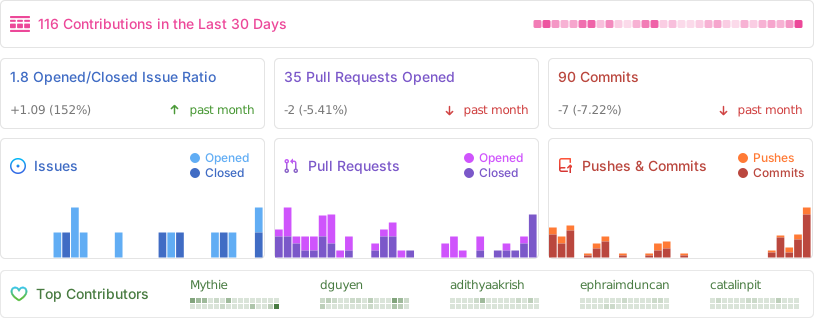
## Repo Activity
|
|
|
|
|